
In most business settings, workflows involve a sequence of interrelated tasks distributed across roles and systems. Until now, large language models (LLMs) have tended to operate in isolation, responding to one-off queries without coordinating broader actions. Sentienta introduces workflow agents that act differently. Rather than simply responding, they structure and drive processes. In this post, we demonstrate how a workflow agent David, takes a compound instruction and performs three coordinated steps: (1) Decomposing intent, (2) Mapping task dependencies, and (3) Orchestrating execution via agent collaboration.
1. The Scenario: A Simple Request with Hidden Complexity
A user submits the following instruction: “Here is our portfolio [AMZN, NVDA, TSLA, GM]. For each stock, if the price decreased by more than 1%, send an alert.”
At first glance, this appears to be a straightforward request. But the instruction conceals multiple steps requiring distinct capabilities: parsing the list of assets, retrieving current stock prices, applying threshold logic, and preparing an alert in the correct format.
David is Sentienta’s workflow agent. To fulfill the request, he relies on a team of specialized agents—such as Angie, who handles online data retrieval; Rob, who focuses on data analysis and threshold logic; and Alec, who formats and delivers outbound messages. David uses his awareness of each agent’s capabilities to deconstruct the request, delegate the appropriate tasks, and coordinate the correct execution sequence.
This simple example introduces the transition from a single human prompt to a structured, multi-agent collaboration.
2. Visualizing the Workflow as a Structured Plan
To manage the user’s request, David constructs a structured plan based on the capabilities of his team. At the core of this plan is a sequence of steps—defined, linked, and conditionally triggered—where outputs of one task feed into the next.
The block diagram below is a high-level abstraction of this internal plan. It shows how David encapsulates the user’s prompt into a coordinated process. Each element in the diagram represents a role or action within the workflow, capturing how Sentienta combines the broad reasoning abilities of language models with the control of a dynamic scheduler. This view is a “pre-expansion plan” where David defines the overall structure, before agents are assigned.
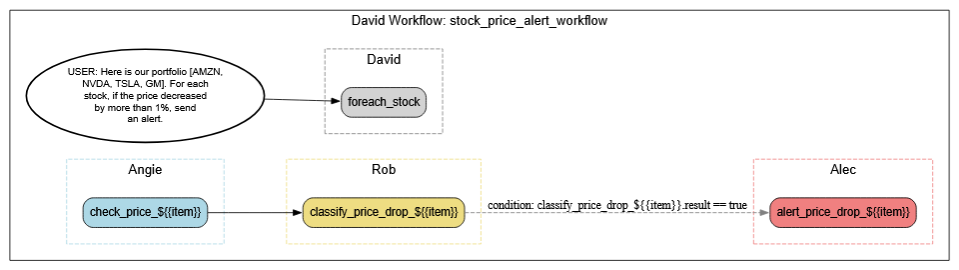
This structure allows David to handle complexity systematically, using reusable patterns that scale across tasks.
3. Expanding Tasks, Assigning Agents, and Filling Gaps
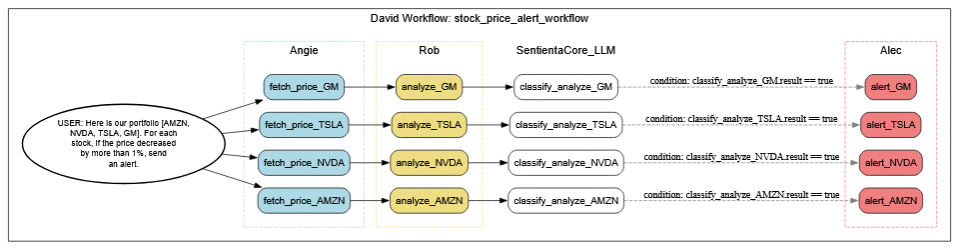
Once David has structured an initial plan, the next step is expansion—where the abstract workflow is broken into explicit, actionable tasks for each stock in the portfolio. This involves branching the workflow into parallel paths, one per stock, and mapping the subtasks to specific agents.
For real-time data retrieval, Angie is assigned to fetch the current price of each stock. Rob takes on the analysis logic—checking whether each stock’s price has dropped more than 1%. Alec is responsible for formatting and sending alerts, but that only happens if the stock meets its threshold condition.
Where explicit agent coverage is missing—such as interpreting threshold evaluation results—David deploys internal language models to classify whether conditions have been met. This ensures nothing gets dropped or left ambiguous, even in cases where no agent matches the need directly.
The diagram below captures this expanded version of the workflow. It shows how each stock’s path is elaborated into three stages (data retrieval, analysis, alert) and where Sentienta’s internal logic steps in dynamically to complete the chain.
4. Seeing the Workflow in Action: Conditional Paths in Real Time
This final diagram provides a runtime view of how David’s workflow executes based on live data. Each block in green indicates a task that was actively executed; grey blocks were skipped due to unmet conditions.
Here, only TSLA and GM triggered alerts—because only those stocks fell below the 1% threshold. This selective activation demonstrates how David uses real-time analysis and embedded logic to trigger only the necessary branches of a plan.

While this stock alert workflow is intentionally simple, it serves as a clear illustration of how Sentienta agents collaborate, reason, and conditionally execute tasks in real time. In follow-up posts, we’ll explore more complex scenarios—like coordinating multi-agent triage in response to supply chain disruptions or chaining diagnostics across departments for strategic escalation—which highlight the full sophistication of Sentienta’s agent framework.
Even more powerfully, workflows like this can be scheduled to run at regular intervals—automatically refreshing data, reevaluating conditions, and feeding results into broader systems of action without manual reentry.









 Sentienta Blog