From governance principle to governance path
A few weeks ago, we argued that enterprise AI needs a governance layer.
That does not mean slowing adoption with more process. It means recognizing that AI is moving beyond individual experimentation. Employees are no longer using models only to summarize, draft, and analyze. They are beginning to work with agents that retrieve information, use tools, trigger workflows, post messages, create issues, and interact with the systems where company work happens.
Once agents can act, governance becomes an operational question.
It is no longer enough to ask whether a model produced a good answer. Organizations must also ask:
- Was the agent authorized to use the service?
- Was the requested action permitted?
- Did it require human approval?
- Which identity and credentials were used?
- What happened when the action ran?
- What record was preserved afterward?
Over the past several weeks, we have introduced the capabilities announced with Sentienta V2, including collaborative Workrooms, governed agents, and controlled execution.
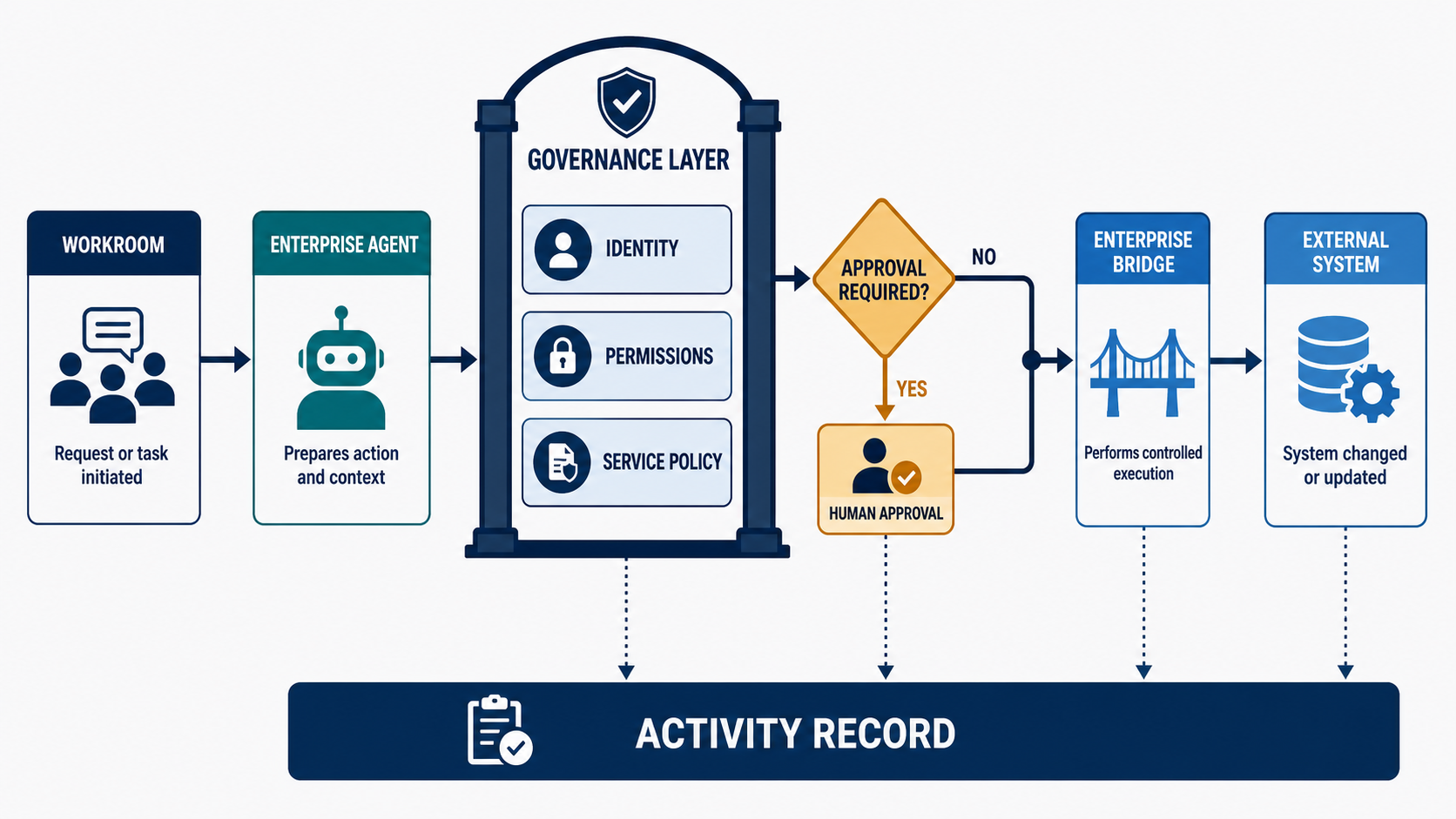
This post looks at how those pieces work together. Agent work begins in a permissioned Workroom, moves through approved capabilities and controlled connections, pauses for human review when required, and leaves an activity record behind.
The principle is straightforward: governance should not exist only in policy documents, administrative settings, or after-the-fact reviews. It should be built into how agent work is requested, authorized, executed, and recorded.
That is what allows agents to move beyond conversation and participate safely in real organizational work.
How Sentienta puts governance into the path of agent work
Sentienta treats governance as part of the workflow—not as a policy document applied after the fact. Controls appear where work is requested, delegated, authorized, executed, and recorded.
1. Workrooms establish the governed context
A Workroom is more than a shared conversation. It provides the operating context for collaboration among people and agents: who is participating, which agents are present, who initiated a request, and who is permitted to manage or stop the work.
Workroom permissions control who can join, contribute, invite participants, manage agents, and halt an active run. These controls establish the context used by Sentienta’s backend when it evaluates an agent request.
Importantly, sharing a Workroom does not share a participant’s credentials, files, device access, or private services. Collaboration and authorization remain separate.
2. Enterprise Agents turn individual experiments into organizational capabilities
Many organizations begin using AI through individual experimentation. Employees create assistants, connect tools, and develop useful workflows—but the resulting capabilities may be difficult for the organization to understand, manage, or reproduce.
Enterprise Agents provide a different model. They are organizational capabilities that can be made available to authorized users and Workrooms. Managers and teams can use approved agents without having to build and configure their own versions.
This allows organizations to decide:
- which Enterprise Agents are available
- who may use and administer them
- which services they may access
- which execution environments they may use
- and how their work is reviewed and recorded
Enterprise Agents therefore turn agent capability from an individual configuration into a managed organizational resource.
3. Roles and permissions separate use from administration
Governance also requires control over who can configure the system. Sentienta distinguishes organization owners, administrators, and members.
Owners and administrators manage organizational membership, Enterprise Agents, available services, and service policies. Members can use the capabilities made available to them without automatically gaining the ability to modify those capabilities or their underlying connections.
This separation allows an organization to delegate useful agent capabilities broadly while keeping configuration and administrative authority appropriately limited.
4. Brokered services mediate access to external systems
When an agent needs to reach an external tool or organization-controlled system, Sentienta can place a governed service layer between the agent’s request and execution.
The important question is not simply whether an agent can connect to a tool. It is whether the organization can control:
- which services are available
- which roles and agents may use them
- which operations are permitted
- where credentials remain
- whether an action requires approval
- and what activity is recorded afterward
Permissions can distinguish among operations such as reading information, creating something new, updating an existing resource, sending a message, or deleting data. This avoids treating “access to a service” as a single all-or-nothing permission.
5. The Enterprise Bridge creates a controlled execution boundary
Some agent work must run in an environment controlled by the organization, for example, when it involves a private network, managed automation host, customer-held credential, internal service, or organization-operated connector.
The Enterprise Bridge provides that execution boundary. It can advertise approved capabilities, receive authorized work, execute through controlled service connections, and return results to the Workroom.
Credentials remain in the appropriate environment rather than being placed in an agent prompt or exposed to Workroom participants. If the required Bridge or service is unavailable, Sentienta can fail the request safely instead of silently choosing another user’s device, credentials, or connection.
This creates a practical middle ground between powerless chatbots and unmanaged automation: agents can perform useful work, but execution follows a controlled organizational path.
6. Approval gates preserve human control
Not every agent contribution needs approval. Research, analysis, comparison, summarization, and drafting should remain fluid.
Consequential actions are different. When an agent is preparing to change external state, such as posting information, creating a record, modifying a resource, or triggering another process, the applicable policy can require human approval before execution.
The agent can prepare the proposed action and present it for review. An authorized person can approve or reject it before the external change occurs. This supports meaningful delegation without requiring the organization to accept unrestricted automation.
7. Activity records make agent work reviewable
A transcript shows what people and agents said, but governance also requires visibility into what the system did.
Sentienta’s Activity records provide structured operational information about a run: the request, participating agents, important execution stages, service activity, approval events, outcomes, and failures. Enterprise governance records provide additional visibility into governed service actions and approval decisions.
These records help managers understand how work progressed and investigate problems without presenting the transcript itself as a complete forensic audit.
What this looks like in practice: posting a Slack update
Imagine a product team using a Sentienta Workroom to coordinate a customer rollout. After resolving the open questions and agreeing on next steps, the manager wants to send a concise update to an internal Slack channel.
An Enterprise Agent can summarize the discussion and draft the message. The governance question is what must happen before that message reaches Slack.
1. The request begins in a Workroom
The request starts where the team is already collaborating. The Workroom provides important context: who made the request, which Enterprise Agent is participating, what discussion led to the update, and who is permitted to manage the work.
Workroom access does not automatically grant Slack access. It establishes the collaboration context that Sentienta carries into the authorization process.
2. The Enterprise Agent prepares the action
The manager asks the Enterprise Agent to draft an update. The agent reviews the relevant discussion, identifies the decisions and next steps, and prepares a proposed Slack message.
Nothing has been posted yet. Drafting creates content inside the Workroom. Posting changes an external system, so it can be governed separately.
3. Sentienta checks the service policy
Before execution, Sentienta checks whether the organization has made Slack available through its governed service configuration.
The system can evaluate whether:
- the requester is an active organization member
- the Enterprise Agent is allowed to use the service
- the requester’s role permits the operation
- the requested Slack channel is configured and allowed
- and posting requires human approval
The existence of a Slack connection is not enough. The specific agent, user, action, and destination must be permitted.
4. An authorized person approves the post
If policy requires approval, Sentienta pauses the action and presents the proposed message for review.
The manager can confirm the content and destination, then approve or reject the request. If changes are needed, the request can be rejected and returned for revision. The external action occurs only after the required approval has been recorded.
5. The Enterprise Bridge executes the approved action
Once approved, the request is sent through the Enterprise Bridge. The Bridge uses the organization’s governed Slack connection, posts the approved message, and returns the result.
Slack credentials remain in the controlled execution environment. They are not placed in the agent prompt, exposed in the Workroom transcript, or shared with participants.
If the Bridge, service connection, or permitted destination is unavailable, the request fails safely rather than switching to an unmanaged connection.
6. Governance activity records the outcome
Sentienta records the relevant operational events, including the requested action, service and destination, approval decision, execution outcome, and any failure.
The Workroom preserves the discussion that produced the update. The governance activity shows how the proposed action moved from drafting through authorization and execution.
In an unmanaged workflow, “an agent posts to Slack” is merely a convenience feature. In a governed workflow, the agent accelerates the task while the organization retains control over authorization, approval, credentials, execution, and review.
Agent actions do not bypass governance. They travel through it.
Conclusion: managing agents that act
The next era of enterprise AI is not only about producing better answers. It is about agents that can retrieve information, post updates, create records, trigger workflows, and interact with the systems where work happens.
That creates a new management challenge. Organizations need to know which agents are trusted, which services they can use, what actions they may take, when human approval is required, how credentials are protected, and what record remains afterward.
The goal is not to slow agents down. It is to give them a safe and accountable path from request to action.
Agents will become useful at organizational scale only when companies can trust what happens beyond the chat window. Sentienta makes that work governed, visible, and manageable while still allowing people and agents to move quickly.