Tag: workflow

  • A Messaging Agent for Powering Workflow Notifications and Alerts

    In previous posts, we showcased end-to-end business workflows where the final step—delivering results or critical notifications—was handled by an “Alec” Messaging Agent. Each workflow diagram highlighted Alec as the automated agent responsible for sending these updates to key stakeholders, acting as the bridge between the team’s AI-driven analysis and real-world action. For reference, you can revisit these detailed walk-throughs here: Managing Portfolio Workflows with Natural Language: A Multi-Agent Use Case, Automating Market Vigilance: Scheduled Workflows for Smarter Portfolio Management, Handling the Heat: Workflow Agents in a Critical Incident.

    Messaging Agent Core Features and Availability

    The Alec agent can be accessed directly from the Agent Marketplace under the Messaging section. Simply navigate to Messaging, select Alec, and either deploy the agent as-is or customize its persona and instructions to fit your workflow—all without coding.

    1. Analyzes natural-language transcripts—agent dialog, user input, and workflow results—to determine the subject and email type (alert, notification, summary).
    2. Auto-selects the correct recipients or distribution list from workflow context and dispatches the message.
    3. Writes delivery status back into the workflow for end-to-end auditability.
    4. Available as a pre-built messaging agent in the Agent Marketplace’s new Messaging section; no-code, drag-and-drop setup.
    5. Fully customizable: adjust persona name, tone, and email-formatting instructions to fit any workflow.

    Example Use Cases

    The first, simple use-case shows how the user can ask Alec to summarize a team discussion and email to a couple of recipients:

    User:Alec - please summarize this dialog and send as an email to nekeh10717@dlbazi.com and chris@sentienta.ai
    
    Wed, 21 May 2025 18:20:42 Alec:
    Email sent to ['nekeh10717@dlbazi.com', 'chris@sentienta.ai']

    Below is an example of the kind of message that Alec will deliver:

    In contrast to the previous example, which highlights Alec’s ability to respond to direct user prompts, the prior use cases focus on Alec’s role in delivering messages as part of automated, executed workflows. In each of these, Alec serves as the final messaging agent in automated workflows, delivering workflow outcomes or critical analysis results to designated stakeholders with context-aware notifications or alerts.

    For example, in this post, Alec provided an alert if the price of a stock in the portfolio dropped below a threshold. In this case, the workflow agent created a task that automatically informed Alec of the message type, content, and the condition for sending it. The following shows the task defined for Alec by the workflow agent:

    {
    "taskID": "send_alert_AMZN",
    "agent": "Alec",
    "dependsOn": "classify_price_drop_AMZN",
    "params": {
    "message": "The price for AMZN has dropped by more than 1%.",
    "subject": "AMZN Price Alert",
    "type": "email"
    }
    }

    Conclusion and Next Steps

    Alec combines no-code simplicity with powerful automation, making it easy to streamline communications across any workflow. Whether sending one-off summaries or powering complex alerting and notification patterns, Alec’s flexibility and seamless setup help teams communicate more efficiently. Explore Alec in the Agent Marketplace to enhance communication across your workflows.

  • Handling the Heat: Workflow Agents in a Critical Incident

    We’ve explored Sentienta workflows across use cases—from multi-agent automation to scheduled portfolio monitoring. Today, we turn to a high-stakes scenario: incident escalation. In this post, we’ll walk through how Sentienta’s workflow agents coordinate a real-time response to a production outage, from root-cause triage to stakeholder communication, rollback decisions, and compliance tracking—all from a single natural-language command. You’ll see how a single NL command triggers coordinated action across agents, ensuring fast response, stakeholder alignment, and full audit trail.

    1. When Checkout Goes Dark: A Production Issue Unfolds

    A cluster of gateway timeouts on the /checkout endpoint triggered immediate concern. User-reported failures confirmed a disruption in transaction processing.

    [14:03:17] ERROR: Gateway timeout on /checkout endpoint  
    [14:03:41] USER_FEEDBACK: “Payment failed twice. Cart cleared.”
    [14:04:02] DEVOPS_COMMAND: David - Escalate a critical timeout issue affecting our checkout API—users are seeing failures in production. Triage the cause, roll back if needed, notify stakeholders across channels, and if rollback is needed also notify of that, log all events for compliance, and track resolution progress until issue closure.
    [14:04:10] TRIGGERED: David-AI Escalation Agent activated

    The workflow agent (‘David’) initiated a structured escalation process in response. Within seconds, task-specific agents were assigned to diagnose the issue, log events, assess rollback requirements, and notify relevant stakeholders according to pre-defined protocols.

    2. Breaking It Down with Agents: From Detection to Resolution

    After receiving the DevOps command, David interprets the NL instruction and initiates a structured escalation workflow. The process begins with timeout escalation and unfolds across task-specific agents that handle tracking, triage, rollback, communication, and compliance:

    1. Maya: Escalates the timeout incident and kicks off formal response procedures.
    2. Jordan: Launches the incident tracker to orchestrate task flow and status checkpoints.
    3. Drew: Analyzes system logs, traces failures, and identifies root causes.
    4. Samira: Prepares for rollback execution if required, coordinating across deployment teams.
    5. SentientaCore_LLM: Classifies whether rollback communication updates are necessary based on task outputs.
    6. Leo: Broadcasts the initial incident update and, conditionally, the rollback status update if rollback is invoked.
    7. Nia: Logs all operational events, tracks communication threads, and generates a final resolution summary for audit trail.

    These agents collaborate in a branching yet traceable flow, dynamically adjusting to task outcomes while documenting every step. Below is a visual representation of the workflow that David triggers based on the input command. Tap to enlarge.

    Note: The following is a representative workflow. Each agent assumes access to required external systems and APIs. Our focus here is the high-level orchestration—driven not by pre-built scripts, but by a simple natural language command to David.

    3. Smart Sequencing and Conditional Updates

    As the agents execute their tasks, conditional branches are evaluated in real-time. The SentientaCore_LLM agent classifies whether a rollback is necessary based on inputs from Drew and Samira. When rollback is triggered, communications unfold automatically:

    [14:07:09] ROLLBACK_FLAG: true — initiating rollback…  
    [14:07:22] UPDATE: Stakeholders notified: “Rollback in progress due to API timeout error.”

    These conditional updates are coordinated by Leo, who adjusts messaging flows based on rollback status. Meanwhile, the agent Nia logs each event, correlates user communications and agent actions, and ensures the incident trail meets compliance requirements in parallel—without delaying resolution.

    This approach ensures that incident response remains adaptive and fully traceable, with no manual scripting or coordination required after the initial natural language command.

    The following simulated log trace demonstrates the types of information each agent records during incident response, how data is transmitted between agents, and how a final resolution report is assembled. While the data inputs are synthetic for demonstration purposes, the underlying workflow—including sequencing, conditional branching, and communication—is real and executed by the David workflow agent. This example highlights the auditability and coordination possible in live deployment scenarios.

    escalate_timeout_issue: Wed, 14 May 2025 15:05:02 Maya: Escalation triggered: "Escalate timeout issue for Checkout" — team engaged for structured resolution.

    initiate_incident_tracker: Wed, 14 May 2025 15:05:06 Jordan: Incident Escalation Tracker initialized for "Checkout API timeout incident." SLA clock started, command visibility established, and role assignments propagated. Awaiting triage input to proceed.

    triage_logs_and_root_cause: Wed, 14 May 2025 15:05:11 Drew: Initial scan of the logs shows a 7.3x spike in 5xx error rates beginning at 15:04:51Z across `/checkout` requests routed to `payment-auth`. A config deployment to `payment-auth` went live at 15:04:49Z. High temporal correlation—likely root cause. Evaluating rollback eligibility.

    status_update_initial: Wed, 14 May 2025 15:05:16 Leo: Stakeholder Notification:
    A timeout incident is currently affecting the Checkout API and disrupting production traffic. An escalation has been initiated and the incident tracker is active with roles assigned. We are currently triaging the issue and will provide updates as diagnostics and mitigation actions progress.

    —Posted via Slack, email, and status banners.

    rollback_if_needed: Wed, 14 May 2025 15:05:20 Samira: Confirm rollback eligibility via deployment metadata and latency/error metrics. If confirmed, initiate scoped rollback to the last green build prior to 15:04:49Z and begin monitoring 5xx activity in 15s intervals.

    final_resolution_summary: Wed, 14 May 2025 15:05:26 Nia: Incident Closure Summary – Checkout API Timeout
    Incident Trigger: Timeout issues affecting the Checkout API detected, causing user-facing failures in production.
    Diagnostic Findings: Root cause traced to a configuration push at 15:04:49Z on the `payment-auth` service. Latency and 5xx errors spiked immediately following the deploy.

    Actions Taken:
    - Rollback eligibility confirmed by Samira using deployment metadata and observed latency/5xx error spikes.
    - Scoped rollback initiated to the last green build preceding 15:04:49Z.
    - Live monitoring of error rates implemented with 15-second resolution.

    Resolution Status: Rollback initiated and service is under observation for full recovery. All activities have been logged; error trend evaluation ongoing.

    Timestamp: 15:05:22 UTC — Summary generated and finalized for audit, compliance, and stakeholder review.

    log_all_events: Wed, 14 May 2025 15:05:33 Nia: Compliance Log – Incident Timeline: Checkout API Timeout

    Status Update Captured:
    - Timestamp: 14 May 2025, 15:05:16 UTC
    - Source: LeoGrant
    - Message: Stakeholder notification regarding a current timeout affecting the Checkout API. Escalation and structured incident tracking are confirmed in progress. Diagnostics are underway. Dissemination via Slack, email, and status banners.

    Audit Actions:
    - Mediums Logged: Slack, email, status page
    - Event Classification: Initial stakeholder communication post-escalation
    - Escalation and Tracking Confirmation: Verified active

    All actions timestamped and archived for audit. Ready for roll-up in closure summary.

    classify_rollback_if_needed: True

    status_update_rollback: Wed, 14 May 2025 15:05:38 Leo: Stakeholder Notification: We've initiated a rollback of the `payment-auth` service after confirming its deployment was the root cause of the Checkout API timeout issue. Users may have experienced degraded service. Rollback is in progress and we're monitoring error rates in real-time. Updates to follow as recovery progresses. This notice has been distributed via Slack, email, and status page.

    4. From Crisis to Closure: Why It Matters

    The checkout failure was resolved in minutes—not hours—because each agent operated autonomously yet in sync, guided by the workflow created by David. By the time rollback completed, stakeholders were already informed, and logs captured every step for audit purposes. This incident illustrates how automation doesn’t eliminate humans; it frees them from coordination overhead while preserving transparency, accountability, and trust in modern incident response.

  • From Prompt to Action: Orchestrating Workflows in Real Time

    In most business settings, workflows involve a sequence of interrelated tasks distributed across roles and systems. Until now, large language models (LLMs) have tended to operate in isolation, responding to one-off queries without coordinating broader actions. Sentienta introduces workflow agents that act differently. Rather than simply responding, they structure and drive processes. In this post, we demonstrate how a workflow agent David, takes a compound instruction and performs three coordinated steps: (1) Decomposing intent, (2) Mapping task dependencies, and (3) Orchestrating execution via agent collaboration.

    1. The Scenario: A Simple Request with Hidden Complexity

    A user submits the following instruction: “Here is our portfolio [AMZN, NVDA, TSLA, GM]. For each stock, if the price decreased by more than 1%, send an alert.”

    At first glance, this appears to be a straightforward request. But the instruction conceals multiple steps requiring distinct capabilities: parsing the list of assets, retrieving current stock prices, applying threshold logic, and preparing an alert in the correct format.

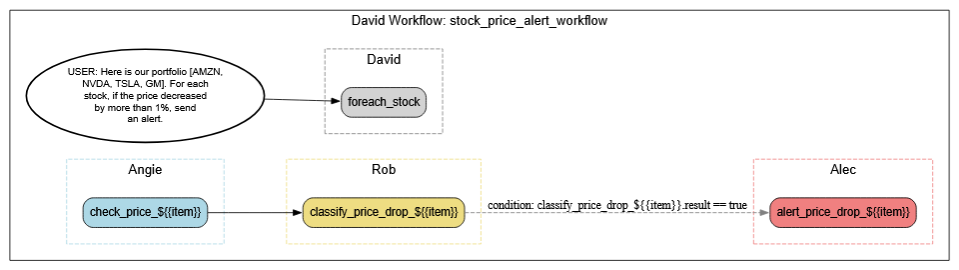
    David is Sentienta’s workflow agent. To fulfill the request, he relies on a team of specialized agents—such as Angie, who handles online data retrieval; Rob, who focuses on data analysis and threshold logic; and Alec, who formats and delivers outbound messages. David uses his awareness of each agent’s capabilities to deconstruct the request, delegate the appropriate tasks, and coordinate the correct execution sequence.

    This simple example introduces the transition from a single human prompt to a structured, multi-agent collaboration.

    2. Visualizing the Workflow as a Structured Plan

    To manage the user’s request, David constructs a structured plan based on the capabilities of his team. At the core of this plan is a sequence of steps—defined, linked, and conditionally triggered—where outputs of one task feed into the next.

    The block diagram below is a high-level abstraction of this internal plan. It shows how David encapsulates the user’s prompt into a coordinated process. Each element in the diagram represents a role or action within the workflow, capturing how Sentienta combines the broad reasoning abilities of language models with the control of a dynamic scheduler. This view is a “pre-expansion plan” where David defines the overall structure, before agents are assigned.

    This structure allows David to handle complexity systematically, using reusable patterns that scale across tasks.

    3. Expanding Tasks, Assigning Agents, and Filling Gaps

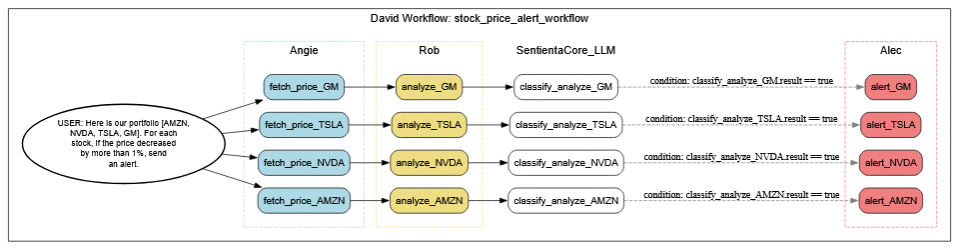
    Once David has structured an initial plan, the next step is expansion—where the abstract workflow is broken into explicit, actionable tasks for each stock in the portfolio. This involves branching the workflow into parallel paths, one per stock, and mapping the subtasks to specific agents.

    For real-time data retrieval, Angie is assigned to fetch the current price of each stock. Rob takes on the analysis logic—checking whether each stock’s price has dropped more than 1%. Alec is responsible for formatting and sending alerts, but that only happens if the stock meets its threshold condition.

    Where explicit agent coverage is missing—such as interpreting threshold evaluation results—David deploys internal language models to classify whether conditions have been met. This ensures nothing gets dropped or left ambiguous, even in cases where no agent matches the need directly.

    The diagram below captures this expanded version of the workflow. It shows how each stock’s path is elaborated into three stages (data retrieval, analysis, alert) and where Sentienta’s internal logic steps in dynamically to complete the chain.

    4. Seeing the Workflow in Action: Conditional Paths in Real Time

    This final diagram provides a runtime view of how David’s workflow executes based on live data. Each block in green indicates a task that was actively executed; grey blocks were skipped due to unmet conditions.

    Here, only TSLA and GM triggered alerts—because only those stocks fell below the 1% threshold. This selective activation demonstrates how David uses real-time analysis and embedded logic to trigger only the necessary branches of a plan.

    While this stock alert workflow is intentionally simple, it serves as a clear illustration of how Sentienta agents collaborate, reason, and conditionally execute tasks in real time. In follow-up posts, we’ll explore more complex scenarios—like coordinating multi-agent triage in response to supply chain disruptions or chaining diagnostics across departments for strategic escalation—which highlight the full sophistication of Sentienta’s agent framework.

    Even more powerfully, workflows like this can be scheduled to run at regular intervals—automatically refreshing data, reevaluating conditions, and feeding results into broader systems of action without manual reentry.