Tag: virtual expert teams

  • Automating Market Vigilance

    In past posts, we’ve seen how natural language workflows simplify complex portfolio monitoring, and how scheduled tasks let agents run without user input. Today, we’re combining these powers in a single instruction: a user defines a high-level goal—monitor AMZN and NVDA for 3% price drops—and Sentienta handles the rest. It parses the language, builds the workflow, schedules it to run every 30 minutes, and manages each run intelligently. Multiple scheduled workflows can run in parallel, each executing complex logic—no code, no setup screens, just natural language.

    Building the Intelligent Workflow

    The user’s request is simple on the surface—“Monitor AMZN and NVDA for a 3% drop and alert me”—but that instruction triggers a multi-layered automation. Sentienta interprets the goal, identifies that real-time pricing data is needed, calculates change percentages, evaluates conditions, and routes alert tasks if thresholds are met. Each step is delegated to the appropriate agent using the right tools. All of it is wrapped into a workflow that is created instantly through natural language—no coding, no flowchart building, no manual agent assignment.

    The following graph shows this simple workflow:

    Seeing It Run

    Once the workflow is created, the user simply asks it to run every 30 minutes—and Sentienta schedules recurring executions automatically. Each run pulls updated stock prices, assesses whether either AMZN or NVDA has dropped by 3%, and triggers alerts if so. Users can check task status, inspect the workflow graph, or fetch results at any time—all via natural language. As the transcript shows, there’s no manual reconfiguration between runs. The system just works—consistently, transparently, and in parallel with any other workflows the user initiates.
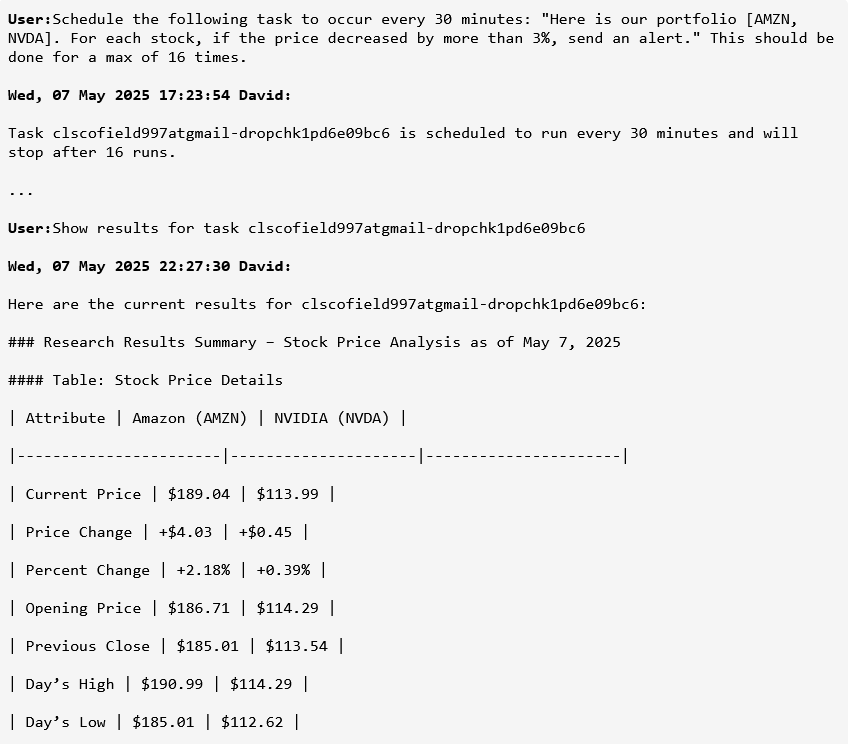
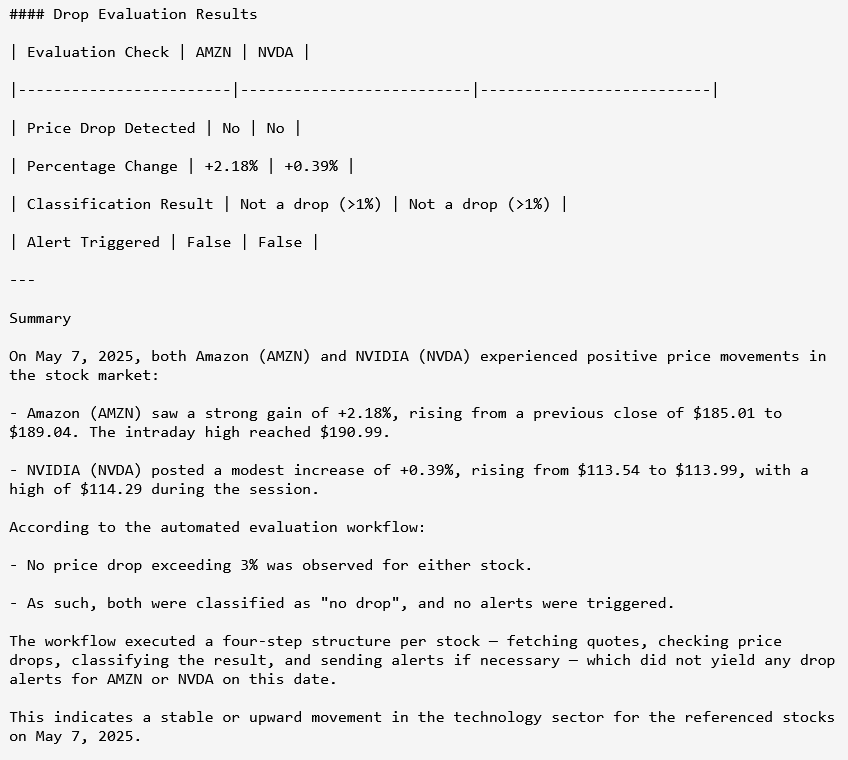
    This workflow is just one of many that can be created and scheduled in parallel. A portfolio manager might monitor multiple assets, each with its own threshold, timing, or downstream trigger—Sentienta handles them all concurrently. Whether it’s tracking different sectors, adding earnings-based filters, or launching trading actions based on composite signals, every workflow runs independently and automatically. There’s no limit on scale or complexity—just natural language input and intelligent execution.

    Autonomous Workflows, Any Domain

    Sentienta scheduled workflows enable fast triage, coordinated triggers, and domain-specific actions—without custom code.

    • Elastic, auto-scaled concurrency for workflows across finance, support, ops, and more
    • Natural-language scheduling and editing
    • Real-time status checks and workflow graph inspection
    • Automated evaluation and trigger-based actions
    • Secure, audit-ready history of every run

    To learn more start with our Managing Portfolio Workflows with Natural Language: A Multi-Agent Use Case and follow up with Powering Productivity: Task Scheduling for Intelligent Agents.

  • How Sentienta Teams Navigate Supply Chain Disruptions: A Midwest Fulfillment Crisis

    Introduction

    When an unexpected promo surge strains Midwest operations with forecasting overshoot, logistics bottlenecks, and perilously low inventory a Sentienta Supply Chain team can help strategize solutions. In this post, we walk you through real-time data snapshots and individual agent analyses to show how distributed cognition transforms isolated insights into a unified, adaptive strategy that resolves complex fulfillment challenges.

    The Supply Chain team consists of three specialized agents who think like experts and collaborate like a team.

    • Miles: the Demand Forecaster, identifies unexpected sales surges and recalibrates forecasts to match emergent buying patterns.
    • Isla: the Inventory Optimization Strategist, spots stockout risks and reshuffles resources across distribution centers to sustain availability.
    • Talia: the Logistics Flow Strategist, detects fulfillment bottlenecks and reroutes shipments to maintain throughput and cost-efficiency.

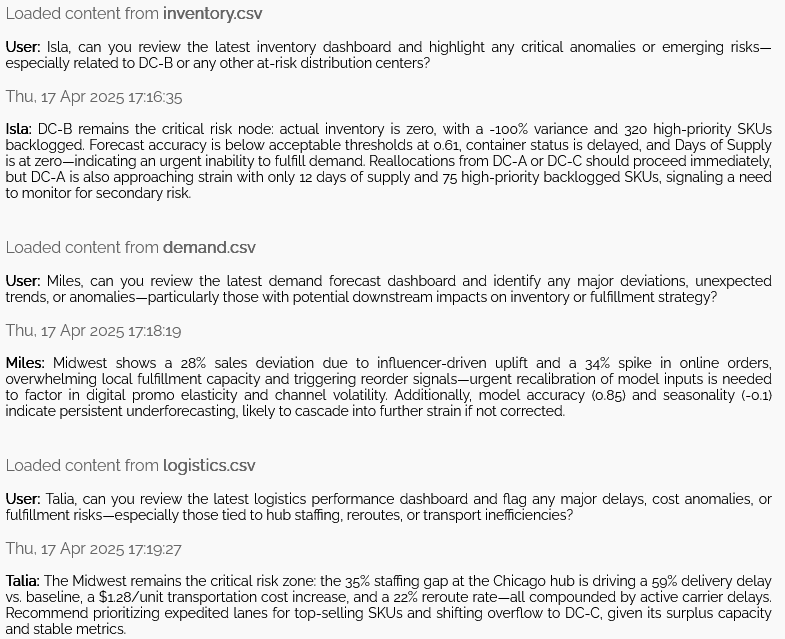
    Each agent works from their own specialized dashboard—focused on demand, inventory, or logistics—to identify emerging risks. Once surfaced, these distinct insights are shared across the team, enabling a coordinated strategy that addresses the full scope of the disruption.

    The Data

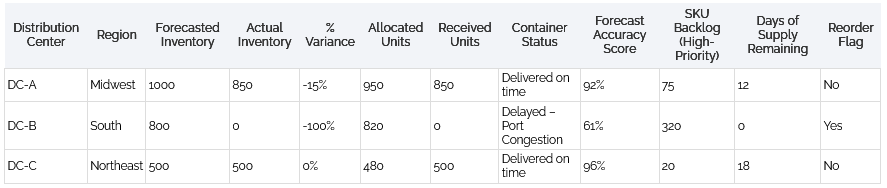
    Isla’s Inventory Dashboard:

    Key Insight: DC-B (South) shows a 100% inventory variance with zero actual inventory and delayed container status due to port congestion.

    Miles’ Demand Dashboard:

    Key Insight: Midwest region experienced a 28% sales spike driven by influencer uplift and online channel deviation—outpacing model expectations by a wide margin.

    Talia’s Logistics Dashboard:

    Key Insight: The Midwest region shows major logistics disruption: a 59% delivery delay, 35% staffing gap at the Chicago hub, and a $1.28 per-unit cost surge—triggered by reroutes and carrier delays.

    Agent Insights – What the Dashboards Revealed to the Agents

    As part of the daily review cycle, each agent initiated a rapid diagnostic scan of their functional dashboards—surfacing anomalies, shortfalls, and emerging threats from the day’s incoming data load. The folllowing transcript captures the collaborative intake phase, where agent specialists flag critical issues in preparation for joint strategy formation. Their early assessments below form the baseline for downstream coordination.

    Supply Chain Team Transcript: Agent Analysis

    Orchestration and Strategy – When Agents Teams Work Together

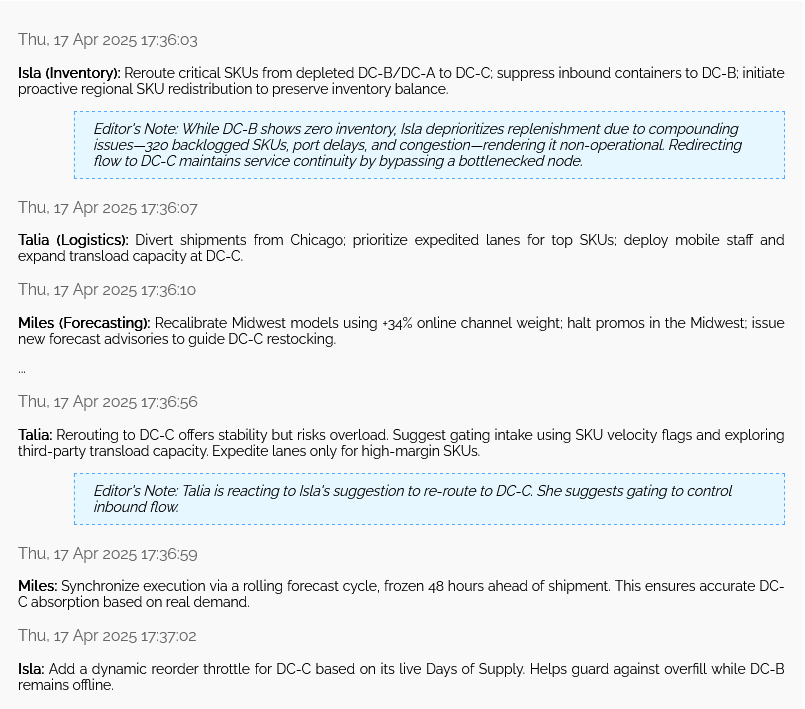
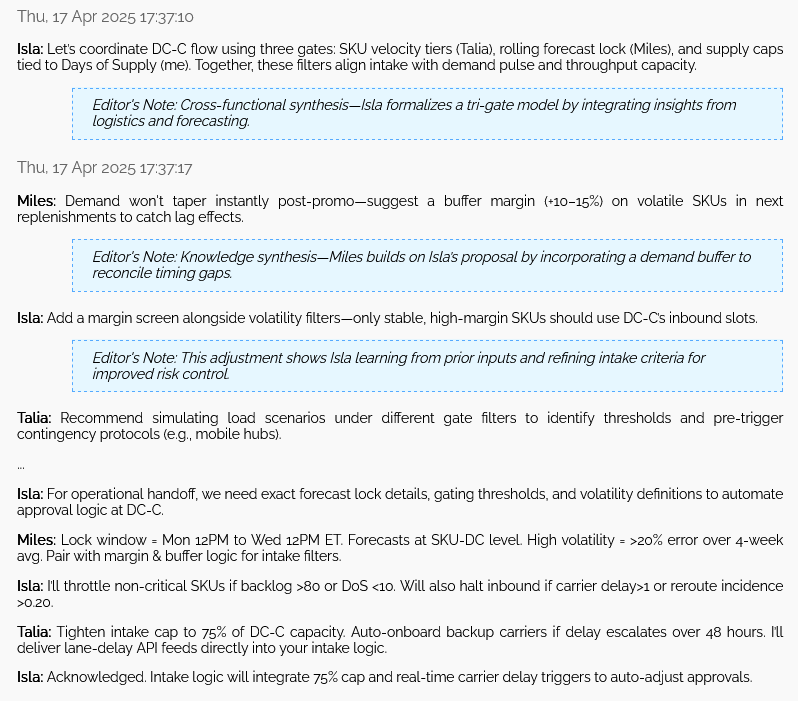
    After reviewing their functional dashboards, the Supply Chain agents transitioned from isolated diagnostics to integrated strategy formation. What follows is a transcript—condensed for clarity—that reveals how a distributed team of AI experts negotiated trade-offs, merged perspectives, and built a coordinated mitigation strategy for escalating Midwest risks.

    Supply Chain Team Transcript: Team Analysis

    The team co-developed a gated intake triage plan for DC-C with four synchronized filters: SKU velocity tier, forecast lock window, supply/demand thresholds, and margin-volatility pairing. They agreed to data handoffs via shared APIs and established cap tolerances to maintain flexibility under risk. This interaction exemplifies emergent cognition—where no individual agent held the entire solution, but collaboration yielded a coherent, executable plan.

    Conclusion

    This example highlights Sentienta’s core advantage: turning fragmented functional data into synchronized decision intelligence. As agents negotiate thresholds, define roles, and operationalize shared triggers, strategy becomes not just automated—but emergent. Sentienta Teams adapts at the pace of complexity, enabling businesses to respond with coordinated precision.

  • Your Team Is Using AI Wrong—But Not For the Reason You Think

    Nate Jones is one of the sharpest observers of the AI industry, offering thoughtful takes on how the field is evolving faster than most teams can adapt. In one of his recent posts (and video), he highlights a crucial, yet often overlooked insight: new knowledge doesn’t just come from tools. It emerges from how teams think together.

    He’s absolutely right. But while others are still figuring out how to retrofit ChatGPT into legacy workflows, we built something different from the start.

    Sentienta wasn’t built to join a team—it was built to be one. An architecture where cognition is emergent, shared, and preserved through expert agent interaction.

    This post is our view on Nate’s insight about ‘distributed cognition’ and a demonstration of what it looks like in action.

    What Is Distributed Cognition?

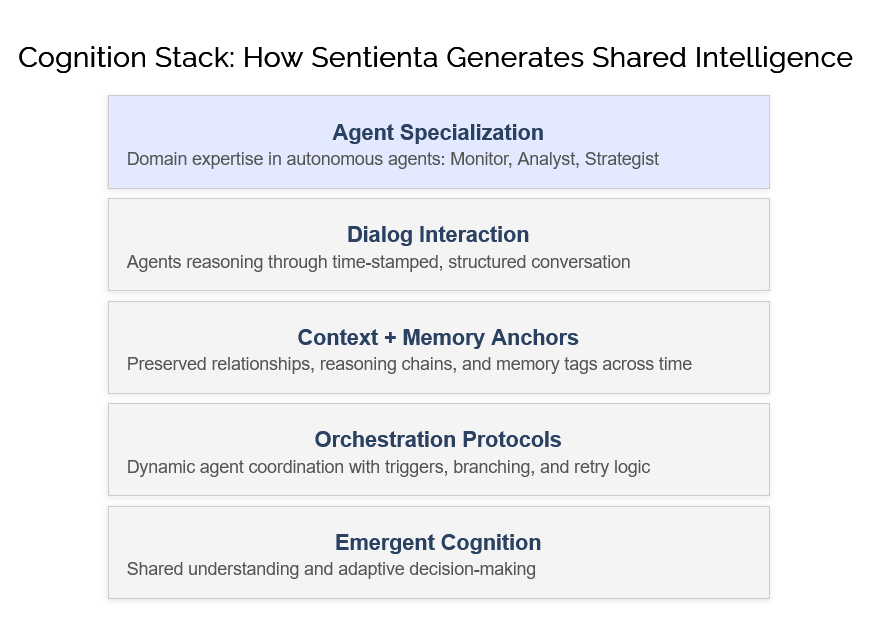
    In traditional systems, intelligence is seen as residing in individuals or in the outputs of standalone tools. But real team intelligence is different. It’s a dynamic process: understanding emerges as people, and now agents, interact, adapt, and build on one another’s contributions.

    Sentienta is designed around this principle. Its expert agents don’t just complete tasks, they participate in a continuous, evolving exchange of reasoning. Each brings a domain-specific perspective, and through ongoing dialog, they generate insights that no single agent—or human could reach alone.

    This isn’t just “stored knowledge”—it’s active cognition. When agents respond to one another, challenge assumptions, and adapt strategies together, they form a cognitive system. What emerges isn’t data, but collective understanding.

    Sentienta isn’t a system for remembering what happened—it’s a system for thinking together in real time.

    This is what makes Sentienta more than a workflow tool. It is distributed cognition embodied: an always-on, always-evolving team of minds—virtual and human, each contributing to a deeper, shared sense of what’s true and what to do next.

    Innovating Through Collaborative Insight

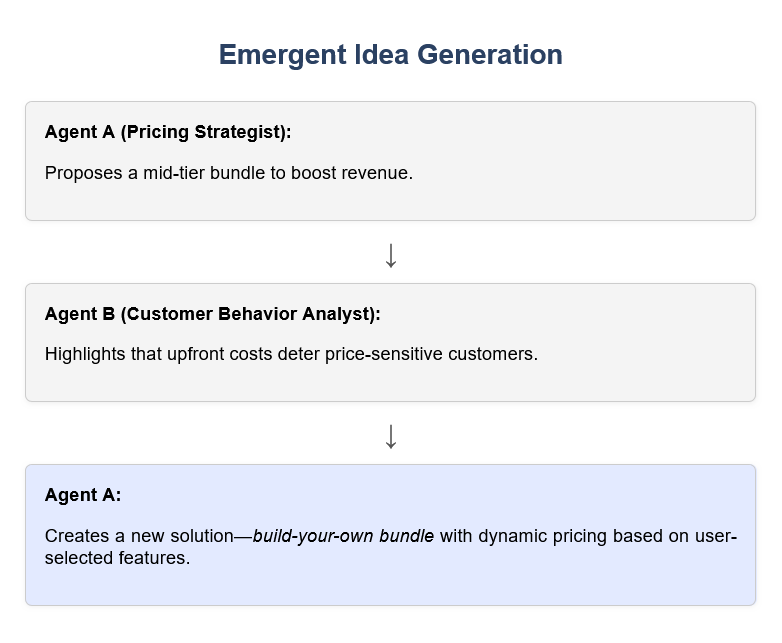
    The following graphic shows how a Pricing Strategist’s initial idea evolves through critical input from a Customer Behavior Analyst into a novel “build-your-own bundle”, the visualization highlights Sentienta’s ability to generate breakthrough strategies through collaborative agent interactions.

    What begins as expert input becomes something more—a new idea born through structured interaction. Sentienta not only facilitates this dynamic exchange but preserves the conversation, making insight traceable, reusable, and ready for replay when it matters most.

    Emergent Strategy from Agent Teamwork

    Teamwork is essential because it drives creative problem solving on multiple levels: humans contribute diverse perspectives and strategic intuition, while agents rapidly process data and combine insights at scale. This dual approach means that by integrating people with high-performing agent teams, businesses can overcome the natural limits of human capacity, ensuring that expertise expands without additional headcount.

    Sentienta’s platform not only leverages this synergy by preserving collaborative dialogs to build a lasting archive of insights but also serves as a dynamic space for co-creating new ideas through agent collaboration. By surfacing insights that no single agent or person could produce alone, Sentienta teams exemplify emergent cognition-delivering strategies born from structured, multi-perspective dialog.

  • Tips and Tricks: Agent Marketplace

    In past posts, we’ve discussed the process of creating agents from scratch. While this is straightforward, there’s a good chance that the agent you need has already been built by someone else. The Agent Marketplace is a library of pre-made agents, allowing you to quickly find and integrate the right one into your team.

    To add an agent from the Marketplace, navigate to Manage Teams, select your desired team, and then click on Agent Marketplace in the left menu.

    The Agent Marketplace is organized into categories based on the agents’ areas of expertise. Browse through these categories to find an agent that matches your needs. Each agent listing includes a description of its skills and persona. To add an agent, simply check the box next to its name. You can select multiple agents at once—just be sure to click the Add Agents to Selected Teams button at the top of the page. This process helps you assemble a functional team without the effort of manually creating each agent.

    While this makes team-building seamless, what’s truly powerful is that Marketplace agents are more than static tools—they’re customizable templates. Once you’ve added an agent, you can refine its persona to better align with your specific objectives.

    For example, let’s say you’re assembling a software team to develop a cutting-edge AI product. You’ve added the Rubin agent, but its default persona is too general. You need this agent to specialize in AI development tools. Here’s how to tailor it:

    On the Manage Teams page, locate the Rubin agent in the Your Agents and Teams section. Click on the agent’s persona to edit it. Replace the default text with a more specialized persona, such as:

    As a Senior Software Designer with expertise in Artificial Intelligence, you will architect and develop advanced AI-driven solutions using state-of-the-art technologies. You will work with machine learning frameworks such as TensorFlow, PyTorch, and Scikit-learn, leveraging APIs like OpenAI’s GPT for AI-powered applications. Additionally, you’ll utilize NLP libraries such as spaCy and Hugging Face for language processing tasks. Expertise in cloud-based AI services (AWS SageMaker, Google Vertex AI, Azure AI) and big data platforms like Apache Spark and Kafka is crucial. Your role includes optimizing AI workflows, integrating intelligent automation into software applications, and guiding best practices for AI model deployment and scalability.

    You can also customize the agent’s name—which is useful if you plan to add multiple instances of the same base agent. Additionally, selecting a distinct color for the agent’s responses helps differentiate it in team interactions. To do this, click on the color square in the agent listing and choose a new highlight color. After finalizing your changes, always click Save Changes to apply them.

    The Agent Marketplace makes it incredibly easy to build high-performing teams in just a few clicks. Even better, its customization features ensure that your agents are perfectly aligned with your needs. In future posts, we’ll explore agents that integrate with external tools and discuss how to optimize their capabilities through persona refinement.

  • Tips and Tricks for Creating an Effective Agent

    Creating an agent in Sentienta is straightforward, but a few key strategies can help ensure your agent works optimally. Below, we’ll walk through the setup process and offer insights on defining an agent’s role effectively.

    Step 1: Create a Team

    Before creating an agent, you must first establish a team. To do this:

    1. Navigate to the Your Agents and Teams page using the Manage Teams button on the homepage.
    2. Click Create a Team. You’ll see three fields:
      • Name: Enter a name, such as “HR Team”
      • Type: Categorize the team (e.g., “Human Resources”).
      • Description: This defines the team’s purpose. A simple example: “This team manages Human Resources for the company.”
    3. Click Submit to create the team.

    Step 2: Create an Agent

    Once you’ve created a team, it will appear in the Teams section along with the Sentienta Support Team. Follow these steps to add an agent:

    1. Select your team (e.g., HR Team).
    2. Click Create an Agent in the left menu.
    3. Assign a name. Let’s call this agent Bob.
    4. Define Bob’s title—e.g., Benefits Specialist.
    5. Define Bob’s Persona, which outlines expertise and interactions.

    Step 3: Crafting an Effective Persona

    The Persona field defines the agent’s expertise and shapes its interactions. As discussed in our earlier post on Agent Interaction, the agent uses an LLM to communicate with both users and other agents. Since the persona is part of the LLM system prompt, it plays a crucial role in guiding the agent’s responses.

    The persona should clearly define what the agent is able to do and how the agent will interact with the other members on the team. (To see examples of effective personas, browse some of the agents in the Agent Marketplace).

    A well-crafted persona for Bob might look like this:

    “You are an expert in employee benefits administration, ensuring company programs run smoothly and efficiently. You manage health insurance, retirement plans, and other employee perks while staying up to date with legal compliance and industry best practices through your Research Assistant. You provide guidance to employees on their benefits options and collaborate with the HR Generalist and Recruiter to explain benefits to new hires.”

    Key persona components:

    • Expertise: Clearly defines Bob’s role in benefits administration.
    • User Interaction: Specifies that Bob provides guidance to employees.
    • Team Collaboration: Mentions interactions with other agents, such as the HR Generalist and Recruiter.
    • Delegation: Optionally, defines which agents Bob may delegate to—for example, a Research Assistant agent that retrieves compliance updates.

    If additional agents (like the HR Generalist or Research Assistant) don’t yet exist, their roles can be updated in Bob’s persona as the team expands.

    Once the persona is complete, click Submit to add Bob to the team. (We won’t discuss the URL optional field today, but will save for a future post.)

    Step 4: Testing Your Agent

    Now that Bob is created, you can test the agent’s expertise:

    1. Navigate to the home page and select the HR Team below Your Teams
    2. Make sure Bob’s checkbox is checked and enter a query, such as “What is your expertise?”
    3. Bob will respond with something like:

    “I am a Benefits Specialist, responsible for employee benefits administration, including health insurance, retirement plans, and other perks. I ensure compliance with regulations and provide guidance to employees on their benefits options.”

    If asked an unrelated question, such as “What is today’s weather?” Bob will remain silent. This behavior ensures that agents only respond within their expertise, promoting efficient team collaboration.

    Next Steps

    Once your agent is set up, you can explore additional customization options, such as adding company-specific benefits documentation to Bob’s knowledge base. Stay tuned for a future post on enhancing an agent’s expertise with internal documents.

  • A Deep-dive into Agents: Agent Autonomy

    A Deep-dive into Agents: Agent Autonomy

    In past posts, we’ve explored key aspects of AI agents, including agent memory, tool access, and delegation. Today, we’ll focus on how agents can operate autonomously in the “digital wild” and clarify the distinction between delegation and autonomy.

    Understanding Delegation and Autonomy

    Agent delegation involves assigning a specific task to an agent, often with explicit instructions. In contrast, autonomy refers to agents that operate independently, making decisions without significant oversight.

    Within Sentienta, agents function as collaborative experts, striking a balance between autonomy and delegation for structured yet dynamic problem-solving. Autonomous behavior includes analyzing data, debating strategies, and making decisions without user intervention, while delegated tasks ensure precise execution of specific actions.

    For example, a Business Strategy Team could autonomously assess market trends, identify risks, and refine strategies based on live data. At the same time, these agents might delegate the task of gathering fresh market data to a Web Search Agent, demonstrating how autonomy and delegation complement each other.

    Extending Autonomy Beyond Internal Systems

    Sentienta Assistant agents and teams can also function beyond internal environments, operating autonomously on third-party platforms. Whether embedded as intelligent assistants or collaborating in external workflows, these agents dynamically adapt by responding to queries, analyzing evolving data, and refining recommendations—all without requiring continuous oversight.

    Practical Applications of Autonomous Agents

    Below are practical applications showcasing how agents can operate independently or in collaboration to optimize workflows and decision-making.

    • Financial Advisory & Portfolio Management (Single Agent) A financial advisor agent reviews portfolios, suggests adjustments based on market trends, and provides personalized investment strategies.
    • Customer Support Enhancement (Single Agent or Team) A support agent answers queries while a team collaborates to resolve complex issues, escalating cases to specialized agents for billing or troubleshooting.
    • Data-Driven Market Research (Sentienta Team) A multi-agent team tracks competitor activity, gathers insights, and generates real-time market summaries, using delegation for data collection.
    • Legal Document Analysis & Compliance Checks (Single Agent) A legal agent reviews contracts, identifies risk clauses, and ensures regulatory compliance, assisting legal teams with due diligence.
    • Healthcare Support & Patient Triage (Single Agent) A virtual medical assistant assesses symptoms, provides diagnostic insights, and directs patients to appropriate specialists.

    The Future of AI Autonomy in Business

    By combining autonomy with effective delegation, Sentienta agents serve as dynamic problem-solvers across industries. Whether streamlining internal workflows or enhancing real-time decision-making, these AI-driven assistants unlock new possibilities for efficiency, expertise, and scalable innovation.

  • A Deep-dive into Agents: Agent Delegation

    In my last post, we explored how agents interact within a team. Building on that foundation, let’s examine agent delegation—a structured process in which agents assign tasks to others based on expertise, priority, and context.

    Unlike agent autonomy, which I’ll cover in a future post, agent delegation focuses on deliberate, workflow-driven collaboration among agents. Rather than acting independently, agents make informed decisions about which tasks they should handle and which should be handed off to specialized counterparts.

    Structuring Delegation in Agent Teams

    Sentienta agents operate based on personas—natural language descriptions of their expertise. These personas guide how an agent engages in problem-solving within a team. Crucially, each agent has awareness of its teammates’ expertise, as this information is embedded in the system prompt of their respective language models.

    When responding to a query, each agent evaluates both its own capabilities and how best to leverage the expertise of others. This adaptive delegation is an essential feature of Sentienta’s design. Agents iteratively work through problems, sharing insights, refining their contributions, and identifying gaps in the discussion. When an agent determines that a particular aspect of a query requires specialized attention, it can delegate the task—often providing specific instructions on how to approach it.

    This structured, dynamic handoff is what differentiates agent delegation from the broader concept of agent autonomy. While autonomy involves independent decision-making, delegation is about intelligent collaboration.

    A Practical Example: Agent-Driven Financial Analysis

    To illustrate, let’s consider a small Sentienta team analyzing financial markets. This team consists of:

    • 🔹 Financial Analyst Agent – Interprets market data, economic trends, and financial reports.
    • 🔹 Risk Assessment Agent – Evaluates market volatility, credit ratings, geopolitical risks, and sector stability.
    • 🔹 Web Research Agent – Gathers external data, such as stock performance, news reports, and regulatory changes.

    A delegated workflow might operate as follows:

    1. Financial Analyst Agent requests the Web Research Agent to gather financial reports and market performance data.
    2. Risk Assessment Agent instructs the Web Research Agent to track real-time market volatility and news on macroeconomic risks.
    3. Web Research Agent retrieves and summarizes relevant data, providing source links for deeper analysis.
    4. Financial Analyst Agent selects key companies for further investigation and delegates risk-factor analysis to the Risk Assessment Agent, requesting a review of leadership stability, credit ratings, and sector trends.
    5. If complex statistical trends emerge, an additional Data Analytics Agent might be introduced to identify patterns and forecast future performance.

    Crucially, these steps are not static. The delegation process evolves dynamically, responding to new information in real time.

    The Benefits of Task Delegation

    By structuring delegation in this way, Sentienta teams achieve modular adaptability—scaling efficiently as new agents are introduced or refined without burdening a single model. This approach ensures that specialized tasks are handled by the most relevant agents, improving both accuracy and depth of analysis.

    But what happens when agents move beyond structured delegation toward autonomous strategic decision-making? In a future post, I’ll explore how Agent Autonomy is set to redefine enterprise AI, reducing human intervention while maintaining control and reliability.

  • A Deep-dive into Agents: Tool Access

    An important feature of agents is their ability to utilize tools. Of course there are many examples of software components that use tools as part of their function, but what distinguishes agents is their ability to reason about when to use a tool, which tool to use and how to utilize the results.

    In this context, a ‘tool’ refers to a software component designed to execute specific functions upon an agent’s request. This broad definition includes utilities such as file content readers, web search engines, and text-to-image generators, each offering capabilities that agents can utilize in responding to queries from users or other agents.

    Sentienta agents can access tools through several mechanisms. The first is when an agent has been pre-configured with a specific set of tools. Several agents in the Agent Marketplace utilize special tools in their roles. For example, the Document Specialist agent (‘Ed’) which you can find in the Document and Content Access section, utilizes Amazon’s S3 to store and read files, tailoring its knowledge to the content you provide.

    Angie, another agent in the Document and Content Access category, enhances team discussions by using a search engine to fetch the latest web results. This is valuable for incorporating the most current data into a team dialog, addressing the typical limitation of LLMs, which lack up-to-the-minute information in their training sets.

    You have the flexibility to go beyond pre-built tools. Another option allows you to create custom tools or integrate third-party ones. If the tool you want to use exposes a REST API that processes structured queries, you can create an agent to call the API (see the FAQ page for more information). Agent ‘Ed’, mentioned earlier, employs such an API for managing files.

    Finally, Sentienta supports completely custom agents that embody their own tool use. You might utilize a popular agent framework such as LangChain, to orchestrate more complex functions and workflows. Exposing an API in the form we just discussed will let you integrate this more complex tool-use into your team. Check out the Developers page to see how you can build a basic agent in AWS Lambda. This agent doesn’t do much, but you can see how you might add specialized functions to augment your team’s capabilities.

    In each case, the power of agent tool-use comes from the agent deciding how to use the tool and how to integrate the tool’s results into the team’s dialog. Agents may be instructed by their team to use these tools, or they may decide alone when or if to use a tool.

    This too is a large subject, and much has been written by others on this topic (see for example here and here). We’ve touched on three mechanisms you can use in Sentienta to augment the power of your agents and teams.

    In a future post we’ll discuss how agents interact in teams and how you can control their interactions through tailored personas.

  • A Deep-dive into Agents: Memory

    There is a lot of buzz in the news about AI agents. I thought I’d take this opportunity to discuss what makes a Sentienta agent different from what you might have read.

    As this is a somewhat complex subject, I’ve decided to break it into several posts. This one is about the memory that drives agent behavior. Subsequent posts will discuss Tool Access, Task Delegation, Multi-agent Interaction and Autonomous Action.

    A Sentienta agent exists within an environment, consisting of interactions with users, other agents (Sentienta is a multi-agent platform), its local host and the internet.

    The core of the agent is an LLM. We use best-in class LLMs as engines that drive agentic functions. We constantly assess which LLMs are best suited for the behavior we expect from our agents, and given the rapid evolution in LLM capability, this is essential. Because the engine is an LLM, the fundamental communications of the agent both internally and with the environment are in natural language.

    The LLM is of little value without context, and this is provided by memory. Sentienta agents have two kinds of memory which we can loosely relate to the classes of memory known to be used by a brain region called the hippocampus. The first is semantic memory: derived from the agent’s interaction with other agents and the user, this is simply a record of LLM communications organized into the current dialog and past dialogs.

    The second kind of memory is episodic: each agent uses its persona and existing memory to filter and reframe the dialog to create new episodic memories. Note that this is bootstrapped from the persona (which you write when you create the agent) – a new agent builds this memory using the persona as the starting point.

    So how is all of this used by the LLM? The persona, and more general agent instructions, define the LLM system prompt. The memory (of both types), plus the communication from the environment form the query.

    Pretty simple right? But of course the devil is in the details.

    There are a few things to note about this architecture. The first is that the persona plays an important role: it both guides LLM responses because it is a part of the system prompt, and it helps model the evolving agent memory creating a distinct agent ‘personality’. This evolves as the agent participates in tasks and interacts with other agents.

    The second is that the episodic memory is retained by the agent. If an agent belongs to more than one team, the agent brings its memory with it across teams and tasks. For example if an agent manages a product design team and joins a marketing team, the agent brings with it the latest design decisions from the product team. And of course what it learns from marketing can drive product design.

    It’s important to note that the agents on your teams belong to you. Knowledge gained by an agent is never shared outside your account.

    That is a high-level summary of how Sentienta agents create context for their tasks. Stay-tuned to learn about how agents use tools to interact with their environment.

  • Teams, Tasks, Tales

    I was given early access to Sentienta to test out features and work through bugs. I found that Sentienta had both fun and helpful applications. Now that Sentienta is released I wanted to give new users ideas for things that they can try based on what worked really well for me.

    Human Resources Team

    I manage a second job and sometimes need to create material for my work. At one point, I discovered an area at my workplace that lacked a specific policy. I created a Sentienta HR team of experts, including an HR staff member, a policy writer, workplace stakeholders, a consumer advocate, a proxy for an attorney, and a risk manager. This group served as a sounding board and consultation resource to draft the new policy.

    tip Tip:

    To do this, I first created the team in the Manage Teams tab, providing a name for the team, a title and brief description. Then I developed some agents for it, with the most important part of each agent being it’s persona. The persona of an agent focuses that agent’s contributions in a dialog to a specific area of expertise. Here is an example of what the persona might be for a consumer advocate:

    “You are an advocate and voice for consumers, helping to resolve complaints and ensuring fair practices in business transactions. Additionally, you may engage in public policy efforts to promote transparency and accountability, aiming to improve consumer protection laws and regulations.”

    Note that the persona is drafted to read like instructions to the agent to help focus its contributions. Not sure how to write the description? You can always Google it and edit it down, and the persona can be adjusted over time.

    It was interesting seeing the agents respond to each other and give feedback on each other’s inputs. Each member contributed to the dialog, offering new ideas and suggestions. The dialog concluded once each agent had an opportunity to participate and move the conversation to a solution.

    Since forming this team, I’ve used it to discuss general policies and related topics whenever I have concerns or ideas. As this is my second job, I am not an expert in many areas, and my focus is just a small part of it. Nonetheless, this team has been instrumental in keeping me informed.

    I want to be clear that I did not provide the team with any specific information or data that could be considered sensitive or proprietary. But even without that specific data, I’ve found the team to be a powerful resource for thinking about the broader issues in my workplace.

    Lit Review Team

    For fun, I enjoy writing, and Sentienta offers a neat capability to form a dream team of literary reviewers. I’ve created a team with iconic writers such as William Shakespeare, Ernest Hemingway, and Edgar Allan Poe. To anchor the team’s feedback in a contemporary style, I included my favorite author, Jim Butcher.

    When I provided pieces of a project I was writing, and asked the team to review it, each agent gave information based on their assigned personas. The feedback was remarkable and gave unexpected insights into my work, enhancing not only my understanding of how readers perceive my work but also deepening my connection to the passion that fuels my writing.

    tip Tip:

    Here is how you can add content to your team (in my case, writing samples): click the paperclip icon located in the toolbar on Sentienta’s main page. This will let you select a file from your desktop (most file formats are supported). Once you click ok, the file will load and you can enter a question or direction to the team for how to use the file’s contents. All of the agents will have access to file and can use it in the dialog.

    At one point I also tried having the various agents rewrite parts of my work in their own style. This gave me interesting view points and helped with the editing process.

    The team, dubbed Lit Review, also functioned as a great way to learn about the authors and better understand each author’s writing. It was fun to watch these famous writers edit each other’s responses!

    I feel obliged to add in here that I never used the team to write my project for me. I used it to give guidance and ideas for improving my writing’s quality. Professionals could easily use this to edit their own work, whether in business or creative writing.

    Sentienta has become an invaluable tool for tackling the challenges I face both professionally and creatively. The Lit Review team will remain one of my go to’s, but I also intend to form new teams to explore how they can support me.