Tag: virtual expert teams

  • Sentienta Connected Services

    Giving Every Agent the Access Its Role Requires
    A cross-functional team may work together on the same problem, but that does not mean every person, or every agent, should have access to the same information.

    As agents become part of everyday work, organizations are unlikely to rely on one universal assistant that knows everything and can access everything. Legal, engineering, sales, finance, and HR each work from different systems, different obligations, and different kinds of evidence.

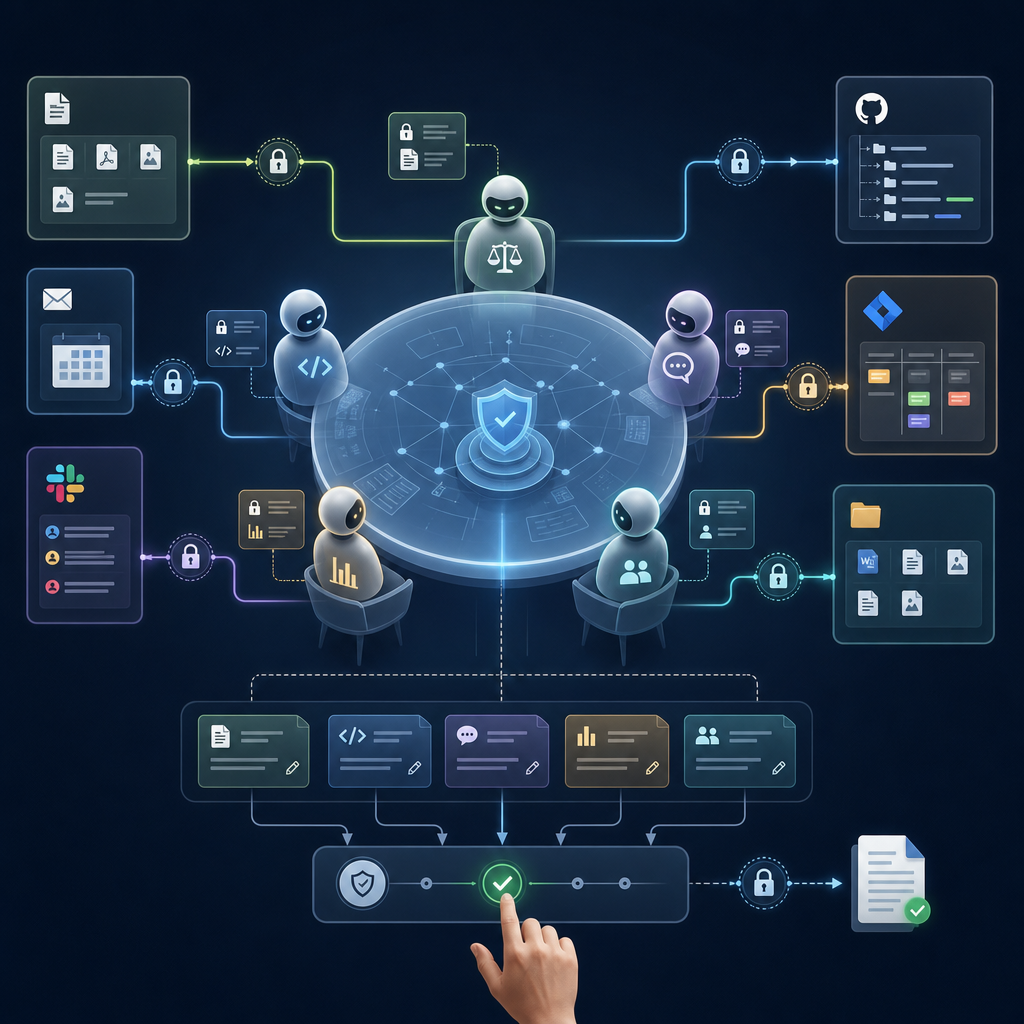
    Connected Services are Sentienta’s answer to that problem. They let users authorize agents to work with the systems where team knowledge already lives, including Google Drive, Gmail, Google Calendar, Slack, GitHub, Jira, and local resources through Sentienta Bridge, without turning that access into a universal permission for every agent in the Workroom.

    In Enterprise AI Needs a Governance Layer, we argued that agent governance begins with access: which agents can reach which organizational systems? In How Sentienta Governs Agent Actions, we described the governed path from a request to an external action.

    Connected Services put those ideas into practice. They allow teams to bring specialist agents and their knowledge sources into a shared Workroom while preserving boundaries around information, authority, and action.

    Access Should Follow Responsibility

    Connected Services let users authorize Sentienta to connect with the systems where their work already lives. The cloud services use supported authorization flows and service APIs. Sentienta Bridge provides a governed path to locally available capabilities such as OpenClaw and selected files.

    Connecting a service does not mean every agent gains access to it. Sentienta treats service access as an agent capability, not as a universal capability of the platform. A user connects a service and then determines which agents may use the relevant capabilities.

    For example, a legal agent might be enabled to access contracts in Google Drive, while an engineering agent is enabled to access GitHub and Jira. An HR agent may need personnel documents and scheduling information. These agents can participate in the same organization without inheriting one another’s access.

    This is a basic governance principle: access should follow responsibility. An agent should receive the capabilities required for its work without automatically inheriting access to every system its user or organization has connected.

    That makes the agent’s role easier to understand and limits the consequences of an incorrect request, an overly broad interpretation, or the accidental use of sensitive information outside its intended context.

    Collaboration Without Erasing Boundaries

    A Sentienta Workroom gives people and agents a shared place to work on a problem, project, or decision.

    Each agent can participate with its own instructions, context, enabled services, permitted operations, and approval requirements. Agents can respond to one another and contribute to the same discussion while their underlying service access remains separately governed.

    This distinction becomes especially important when an agent retrieves private information.

    Information retrieved from a user’s connected service is returned in a Private Workroom card. It is not automatically visible to other participants, other agents, or outside collaborators. The user can review the result and decide what, if anything, should be shared with the Workroom.

    The team can therefore share a relevant conclusion without exposing every contract, email, issue, file, or record that contributed to it.

    Consider a company deciding whether to make a significant product commitment to a customer.

    The Workroom includes agents representing sales, legal, engineering, and finance, along with the managers responsible for the decision. Sales can explain what the customer requested. Legal can clarify what the contract permits. Engineering can assess product readiness and implementation risk. Finance can describe the applicable budget constraint.

    Each contribution is informed by the systems suited to that role. The participants can compare their findings and reach a coordinated judgment without opening every underlying source to everyone in the Workroom.

    From Governed Access to Coordinated Action

    Connected Services do more than help agents retrieve information. They also allow the Workroom team to prepare and carry out follow-up work in the systems where that work belongs.

    In the customer commitment example, the engineering agent might review GitHub activity and related Jira issues. The legal agent might locate the applicable contract language in Drive. The sales agent might review customer correspondence and prepare a follow-up message. A project coordinator might prepare a meeting, while a communications agent prepares a summary for Slack.

    These are not necessarily the capabilities of one universal agent. Work is directed to the agent whose role and service permissions match the request. One agent may have several capabilities when its assignment requires them, but access is granted deliberately rather than assumed.

    The interaction remains natural. A user can ask Engineering whether a correction was deployed, ask Legal to find a contract provision, or ask the project coordinator to prepare a follow-up meeting. The appropriate agent uses its enabled services to retrieve information or prepare the requested action.

    Retrieval and analysis do not automatically authorize an external change.

    When a proposed action would send, post, create, update, or delete information, Sentienta can require the user to review what will change, which service and destination will be used, and which agent prepared the action.

    Approval applies to the proposed operation. It is not blanket authorization for unrelated future activity.

    The result is a layered governance path:

    1. The user authorizes a service connection.
    2. The user enables specific capabilities for specific agents.
    3. The user selects the agents participating in the Workroom.
    4. Each agent contributes from its permitted information sources.
    5. Retrieved private information remains private unless the user shares it.
    6. Consequential actions are handled according to the applicable authority and approval policy.
    7. The activity and outcome remain part of the operational record.

    Each layer answers a different governance question. Together, they allow a team to move from distributed evidence to a coordinated decision and then to accountable action.

    Governance Makes Greater Capability Possible

    Connected Services provide immediate practical value. They let Sentienta agents work with documents, communications, schedules, repositories, issues, and local resources without requiring users to carry information manually in and out of a chat window.

    Their larger importance, however, is how they prepare for a world of specialist agents.

    As departments develop agents around their own responsibilities and knowledge, those agents will need to collaborate across organizational boundaries. Collaboration cannot mean giving every agent access to every system. It must preserve meaningful distinctions among roles, information, and authority.

    Sentienta Workrooms provide the shared environment for that collaboration. Connected Services give individual agents bounded access to the knowledge and tools their work requires. Private cards support selective disclosure. Approval controls govern consequential actions.

    Governance is therefore not a restriction added after an agent has been made powerful. It is the structure that allows organizations to give agents meaningful capabilities safely.

    The future is not one agent with all of the company’s knowledge. It is a governed team of people and agents, each contributing the knowledge and capabilities appropriate to its responsibility.

  • Why Intelligence Needs More Than One Model

    A new idea is moving toward the center of the AI conversation: world models.

    As New Scientist recently noted, researchers and companies including DeepMind, AMI Labs, and World Labs are paying renewed attention to systems that can do more than generate language. The shared intuition is that an AI system that plans and acts needs some way to model consequences; not just describe what is happening, but anticipate what may happen next.

    That shift matters because it challenges the assumption that intelligence is mainly a language problem.

    A language model can explain what might happen if a warehouse robot places a heavy box on an unstable shelf. It can discuss balance, weight, gravity, and risk. But explanation is not the same as a working model of the situation. To act reliably, the system needs some representation of objects, forces, uncertainty, and possible failure.

    World models are one answer to that gap.

    But they also raise a deeper question: does intelligence depend on one model of the world, or many?

    Josh Tenenbaum’s point, raised in that discussion, is that human beings do not seem to reason with one universal internal model. We use different models for different situations: physical models to predict motion, social models to interpret other people, causal models to diagnose failures, ethical models to weigh responsibility, and organizational models to determine who needs to act next.

    That observation points beyond the current debate about physical world models. The larger lesson may be that intelligence requires multiple models brought to bear on the same problem.

    For organizations, the parallel is direct. Business decisions are constrained from many directions at once: technical feasibility, customer value, legal defensibility, operational readiness, financial discipline, governance, and human accountability. The challenge is not simply getting AI to produce an answer. It is creating a reasoning process in which these different constraints can shape the work over time.

    Why Structured Multi-Agent Reasoning Matters

    This is the starting point of a recent arXiv paper, Multi-Agent Constraint Factorization Reveals Latent Invariant Solution Structure.

    The paper asks how multi-agent systems can sometimes reach better solutions than a single model, even when the agents have access to the same information.

    The answer is not simply “more agents.”

    More agents can create noise, duplication, circular debate, and unresolved disagreement. A group of models talking to one another is not automatically more intelligent than one model working alone. The value depends on how the reasoning process is structured.

    The paper formalizes one way to understand that structure.

    Instead of treating each agent as another source of opinion, it models agents as applying different families of constraints to a shared solution state. One agent may enforce one kind of requirement, while another enforces a different one. The solution evolves as those constraints are applied, composed, and reapplied.

    A single model asked to solve a complex problem may try to satisfy every requirement at once. It must consider feasibility, risk, value, timing, governance, and next steps within one reasoning process. That can be useful, but it compresses many distinct pressures into a single pass.

    A structured multi-agent system organizes the problem differently. Different agents apply different pressures to the same evolving answer. One may test whether a proposal is feasible. Another may look for risk. Another may challenge assumptions. Another may check whether the next step has a clear owner.

    The system is not merely collecting independent opinions and averaging them. It allows different constraints to act on the work separately, visibly, and repeatedly.

    Under the formal model in the paper, composing these constraint-enforcement operators can make certain invariant solution structures dynamically accessible, structures that a single agent applying all constraints at once may not reliably reach.

    Put more simply:

    A single model may try to satisfy every requirement at once. A structured multi-agent system allows different requirements to reshape the answer through interaction.

    That does not mean multi-agent systems are automatically better. Their effectiveness still depends on model quality, role design, shared-state clarity, and human judgment.

    But it does suggest why structured multi-agent reasoning is more than a way to generate additional text. Properly designed, it changes the reasoning process itself. It can make conflicts visible, force revisions into the open, and expose which risks, assumptions, and decisions remain unresolved.

    This is the bridge from world models to multi-agent systems.

    World models show why language alone may not be enough. Structured multi-agent systems suggest why complex intelligence may also require more than one reasoning model.

    From Multiple Models to Workrooms

    If intelligence depends on multiple interacting models, enterprise AI should not be organized solely around a single answer box.

    That is the limitation of the default chatbot pattern. One user asks one model a question, and the model produces one response. Even when the response is useful, the reasoning is compressed, difficult to inspect, and hard to turn into accountable action.

    Real organizational decisions work differently.

    A company deciding whether to launch a product is not solving one problem. It is solving several at once. The product must be valuable to customers and technically ready. The support team must be prepared. External claims must be defensible. The timing must make business sense. Someone must ultimately own the decision.

    These are not merely checklist items. They are different models of the work.

    In a Sentienta Workroom, those models can be represented by different agents and human participants applying distinct operational lenses to the same evolving problem.

    A team may begin with a simple question: “Are we ready to launch?”

    One agent may support the launch based on customer value. Another may object on reliability grounds. Compliance may revise the external claims. Support may identify readiness gaps. A human manager may narrow the scope, assign ownership, and decide what can move forward.

    The plan improves because it is not treated as a one-shot answer. It develops as different perspectives test and revise the shared work.

    That is what a Workroom is designed to support.

    Its value does not come from creating more AI voices. It comes from giving people and agents a governed environment in which distinct constraints can shape the same decision over time, while preserving context, ownership, reviewability, and human judgment.

    The result is not simply a conversation. It is a more structured path from uncertainty to decision readiness.

    In that sense, a Workroom is not merely a collaboration interface. It is a practical architecture for turning coordinated intelligence into accountable work.

    Conclusion: Intelligence Through Interaction

    The world-model debate raises a question larger than how AI represents physical reality: whether complex intelligence can be contained within any single model.

    Our argument is that better solutions can emerge when different models apply distinct constraints to shared work and revise it through interaction. For businesses, this is not an abstract problem. Important decisions already require technical, commercial, operational, legal, and human perspectives to be reconciled.

    Sentienta Workrooms are built around that premise. Their purpose is not to multiply AI responses, but to help people and agents reason together until a complex problem becomes a decision someone can understand, own, and act upon.

  • How Sentienta Governs Agent Actions

    From governance principle to governance path

    Sentienta Governance

    A few weeks ago, we argued that enterprise AI needs a governance layer.

    That does not mean slowing adoption with more process. It means recognizing that AI is moving beyond individual experimentation. Employees are no longer using models only to summarize, draft, and analyze. They are beginning to work with agents that retrieve information, use tools, trigger workflows, post messages, create issues, and interact with the systems where company work happens.

    Once agents can act, governance becomes an operational question.

    It is no longer enough to ask whether a model produced a good answer. Organizations must also ask:

    • Was the agent authorized to use the service?
    • Was the requested action permitted?
    • Did it require human approval?
    • Which identity and credentials were used?
    • What happened when the action ran?
    • What record was preserved afterward?

    Over the past several weeks, we have introduced the capabilities announced with Sentienta V2, including collaborative Workrooms, governed agents, and controlled execution.

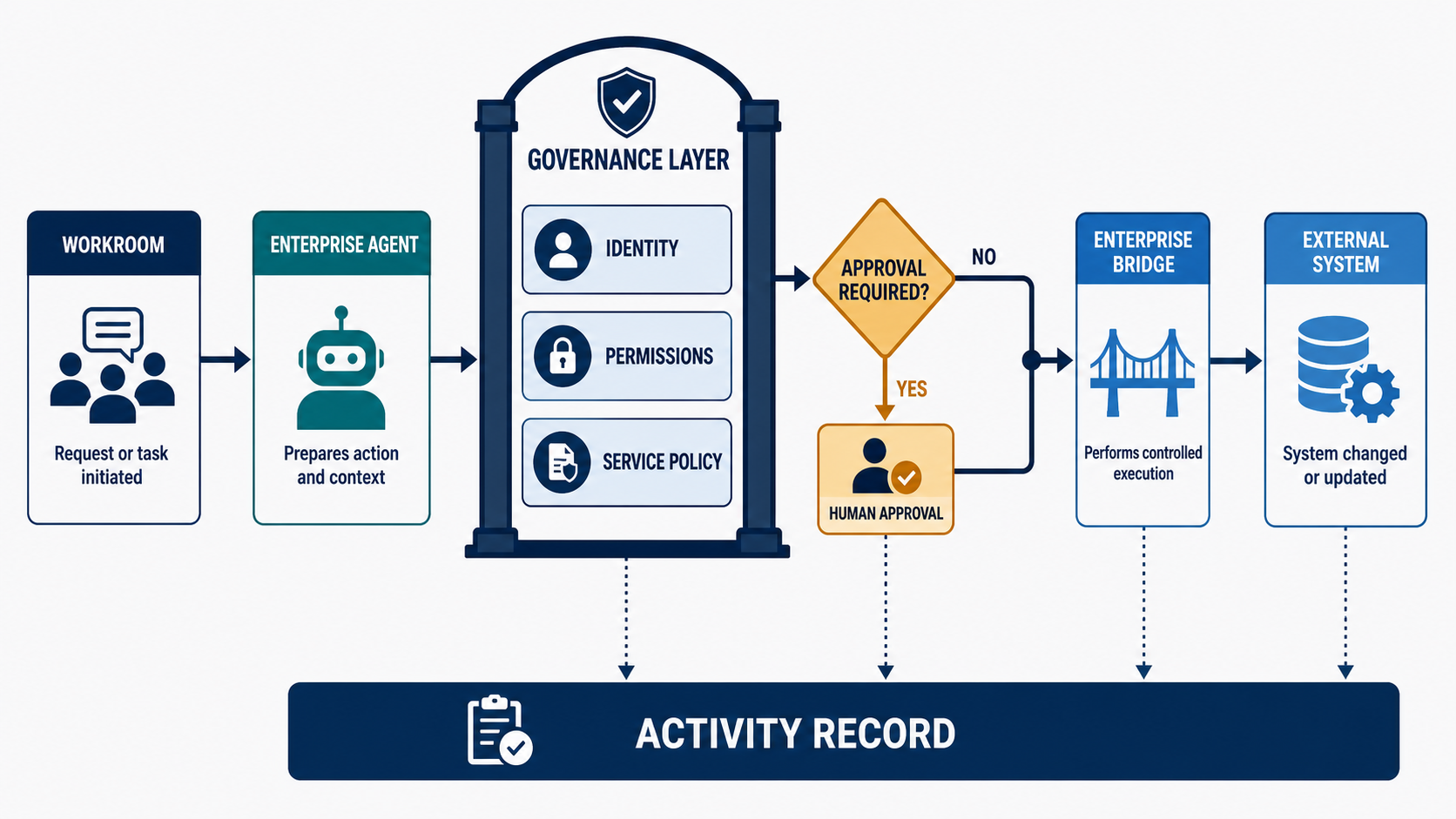
    This post looks at how those pieces work together. Agent work begins in a permissioned Workroom, moves through approved capabilities and controlled connections, pauses for human review when required, and leaves an activity record behind.

    The principle is straightforward: governance should not exist only in policy documents, administrative settings, or after-the-fact reviews. It should be built into how agent work is requested, authorized, executed, and recorded.

    That is what allows agents to move beyond conversation and participate safely in real organizational work.

    How Sentienta puts governance into the path of agent work

    Sentienta treats governance as part of the workflow—not as a policy document applied after the fact. Controls appear where work is requested, delegated, authorized, executed, and recorded.

    1. Workrooms establish the governed context

    A Workroom is more than a shared conversation. It provides the operating context for collaboration among people and agents: who is participating, which agents are present, who initiated a request, and who is permitted to manage or stop the work.

    Workroom permissions control who can join, contribute, invite participants, manage agents, and halt an active run. These controls establish the context used by Sentienta’s backend when it evaluates an agent request.

    Importantly, sharing a Workroom does not share a participant’s credentials, files, device access, or private services. Collaboration and authorization remain separate.

    2. Enterprise Agents turn individual experiments into organizational capabilities

    Many organizations begin using AI through individual experimentation. Employees create assistants, connect tools, and develop useful workflows—but the resulting capabilities may be difficult for the organization to understand, manage, or reproduce.

    Enterprise Agents provide a different model. They are organizational capabilities that can be made available to authorized users and Workrooms. Managers and teams can use approved agents without having to build and configure their own versions.

    This allows organizations to decide:

    • which Enterprise Agents are available
    • who may use and administer them
    • which services they may access
    • which execution environments they may use
    • and how their work is reviewed and recorded

    Enterprise Agents therefore turn agent capability from an individual configuration into a managed organizational resource.

    3. Roles and permissions separate use from administration

    Governance also requires control over who can configure the system. Sentienta distinguishes organization owners, administrators, and members.

    Owners and administrators manage organizational membership, Enterprise Agents, available services, and service policies. Members can use the capabilities made available to them without automatically gaining the ability to modify those capabilities or their underlying connections.

    This separation allows an organization to delegate useful agent capabilities broadly while keeping configuration and administrative authority appropriately limited.

    4. Brokered services mediate access to external systems

    When an agent needs to reach an external tool or organization-controlled system, Sentienta can place a governed service layer between the agent’s request and execution.

    The important question is not simply whether an agent can connect to a tool. It is whether the organization can control:

    • which services are available
    • which roles and agents may use them
    • which operations are permitted
    • where credentials remain
    • whether an action requires approval
    • and what activity is recorded afterward

    Permissions can distinguish among operations such as reading information, creating something new, updating an existing resource, sending a message, or deleting data. This avoids treating “access to a service” as a single all-or-nothing permission.

    5. The Enterprise Bridge creates a controlled execution boundary

    Some agent work must run in an environment controlled by the organization, for example, when it involves a private network, managed automation host, customer-held credential, internal service, or organization-operated connector.

    The Enterprise Bridge provides that execution boundary. It can advertise approved capabilities, receive authorized work, execute through controlled service connections, and return results to the Workroom.

    Credentials remain in the appropriate environment rather than being placed in an agent prompt or exposed to Workroom participants. If the required Bridge or service is unavailable, Sentienta can fail the request safely instead of silently choosing another user’s device, credentials, or connection.

    This creates a practical middle ground between powerless chatbots and unmanaged automation: agents can perform useful work, but execution follows a controlled organizational path.

    6. Approval gates preserve human control

    Not every agent contribution needs approval. Research, analysis, comparison, summarization, and drafting should remain fluid.

    Consequential actions are different. When an agent is preparing to change external state, such as posting information, creating a record, modifying a resource, or triggering another process, the applicable policy can require human approval before execution.

    The agent can prepare the proposed action and present it for review. An authorized person can approve or reject it before the external change occurs. This supports meaningful delegation without requiring the organization to accept unrestricted automation.

    7. Activity records make agent work reviewable

    A transcript shows what people and agents said, but governance also requires visibility into what the system did.

    Sentienta’s Activity records provide structured operational information about a run: the request, participating agents, important execution stages, service activity, approval events, outcomes, and failures. Enterprise governance records provide additional visibility into governed service actions and approval decisions.

    These records help managers understand how work progressed and investigate problems without presenting the transcript itself as a complete forensic audit.

    What this looks like in practice: posting a Slack update

    Imagine a product team using a Sentienta Workroom to coordinate a customer rollout. After resolving the open questions and agreeing on next steps, the manager wants to send a concise update to an internal Slack channel.

    An Enterprise Agent can summarize the discussion and draft the message. The governance question is what must happen before that message reaches Slack.

    1. The request begins in a Workroom

    The request starts where the team is already collaborating. The Workroom provides important context: who made the request, which Enterprise Agent is participating, what discussion led to the update, and who is permitted to manage the work.

    Workroom access does not automatically grant Slack access. It establishes the collaboration context that Sentienta carries into the authorization process.

    2. The Enterprise Agent prepares the action

    The manager asks the Enterprise Agent to draft an update. The agent reviews the relevant discussion, identifies the decisions and next steps, and prepares a proposed Slack message.

    Nothing has been posted yet. Drafting creates content inside the Workroom. Posting changes an external system, so it can be governed separately.

    3. Sentienta checks the service policy

    Before execution, Sentienta checks whether the organization has made Slack available through its governed service configuration.

    The system can evaluate whether:

    • the requester is an active organization member
    • the Enterprise Agent is allowed to use the service
    • the requester’s role permits the operation
    • the requested Slack channel is configured and allowed
    • and posting requires human approval

    The existence of a Slack connection is not enough. The specific agent, user, action, and destination must be permitted.

    4. An authorized person approves the post

    If policy requires approval, Sentienta pauses the action and presents the proposed message for review.

    The manager can confirm the content and destination, then approve or reject the request. If changes are needed, the request can be rejected and returned for revision. The external action occurs only after the required approval has been recorded.

    5. The Enterprise Bridge executes the approved action

    Once approved, the request is sent through the Enterprise Bridge. The Bridge uses the organization’s governed Slack connection, posts the approved message, and returns the result.

    Slack credentials remain in the controlled execution environment. They are not placed in the agent prompt, exposed in the Workroom transcript, or shared with participants.

    If the Bridge, service connection, or permitted destination is unavailable, the request fails safely rather than switching to an unmanaged connection.

    6. Governance activity records the outcome

    Sentienta records the relevant operational events, including the requested action, service and destination, approval decision, execution outcome, and any failure.

    The Workroom preserves the discussion that produced the update. The governance activity shows how the proposed action moved from drafting through authorization and execution.

    In an unmanaged workflow, “an agent posts to Slack” is merely a convenience feature. In a governed workflow, the agent accelerates the task while the organization retains control over authorization, approval, credentials, execution, and review.

    Agent actions do not bypass governance. They travel through it.

    Conclusion: managing agents that act

    The next era of enterprise AI is not only about producing better answers. It is about agents that can retrieve information, post updates, create records, trigger workflows, and interact with the systems where work happens.

    That creates a new management challenge. Organizations need to know which agents are trusted, which services they can use, what actions they may take, when human approval is required, how credentials are protected, and what record remains afterward.

    The goal is not to slow agents down. It is to give them a safe and accountable path from request to action.

    Agents will become useful at organizational scale only when companies can trust what happens beyond the chat window. Sentienta makes that work governed, visible, and manageable while still allowing people and agents to move quickly.

  • Managers Are Being Told to Implement AI


    Now They Have to Make It Work

    Business leaders are under pressure to move faster on AI. Competitors are adopting it, boards are asking about it, vendors are promising productivity gains, and employees are already using chatbots, copilots, and agents in their day-to-day work. At the executive level, the mandate can sound simple: implement AI.

    But that mandate becomes much more complicated when it reaches managers.

    For a manager, implementing AI is not just a tooling decision. It means figuring out how AI-assisted work should function inside a real team: how people and agents collaborate, how outputs are reviewed, how decisions are explained, how workflows change, and how accountability is maintained when the work is no longer produced by people alone.

    The research points to a clear pattern. AI adoption is moving faster than the management systems, intelligence infrastructure, and workflow designs needed to make that adoption useful at scale.

    Gartner reported that only 45% of managers say AI has improved their teams’ work as much as expected (Gartner, March 4, 2026). A subsequent study on agentic AI goes further: managers are no longer overseeing only people and tasks; they are increasingly accountable for the behavior, outputs, and risks of autonomous digital agents operating alongside their teams. Gartner also notes that AI-driven productivity gains can bring hidden oversight costs, with 75% of CHROs saying managers are more overwhelmed than ever (Gartner, May 6, 2026).

    IDC describes a related problem as an “intelligence gap”: organizations are piloting and deploying AI faster than they are building the intelligence infrastructure required to support good decisions at scale. In the same study, IDC found that only 39.6% of enterprises say AI governance is a top priority in 2026, even as agents take on broader decision-making roles across the organization. Without a reliable, traceable intelligence layer, governance becomes difficult to operationalize (IDC, June 24, 2026).

    BCG adds another dimension: their study found that 47% of respondents report spending more time managing and directing AI than doing the work itself, while 41% report increased cognitive load. BCG calls this the “joy paradox”: AI can make work better and harder at the same time. Their most important insight may be that the first wave of AI focused on individual productivity, but the next wave will need to transform collective work(BCG, June 3, 2026).

    Taken together, these findings sharpen the real problem.

    Companies are pushing AI into teams faster than they are redesigning the management, workflow, and intelligence systems around it. Managers are being asked to turn scattered AI activity into useful team performance, even though the operating model for doing that is still unclear.

    The AI Implementation Problem Now Lands on Managers

    For managers, AI-assisted work is becoming harder to see, harder to trust, and harder to coordinate.

    Managers are no longer reviewing work created only by people. They may be reviewing work shaped by prompts, copilots, agents, retrieved sources, automated workflows, and human edits. That changes the oversight question. It is no longer enough to ask whether the work was completed. Managers also need to understand what the AI contributed, what sources were used, what assumptions were made, what risks were surfaced, and what still requires human judgment.

    The same issue shows up in trust. A polished AI answer can look complete while resting on weak evidence, missing context, or untested assumptions. For managers, the question is not simply whether an output sounds right. It is whether the work behind the answer can be inspected before the organization acts on it.

    AI also creates a coordination challenge. It can help individuals draft, summarize, research, and analyze faster, but faster individual work does not automatically become better team performance. Without a shared place to review the work, preserve the reasoning, and connect it to a decision, AI activity can remain scattered across private chats, documents, and meetings.

    This is where the management burden becomes clear. Managers are expected to turn AI from a set of individual productivity experiments into a reliable way for teams to work. That requires more than access to models. It requires a practical layer for directing the work, reviewing the evidence, preserving the reasoning, and coordinating people and agents around shared outcomes.

    That is the missing layer.

    Managers do not need another AI tool that simply produces more output. They need a shared operating space where AI-assisted work can be directed, reviewed, challenged, captured, and turned into decisions the team can explain.

    How Sentienta Helps

    Sentienta is designed around that management problem.

    Sentienta gives teams shared Workrooms for AI-assisted work. Instead of scattering AI activity across private chats and disconnected tools, Workrooms give managers and teams a common place to collaborate with specialized agents, review contributions, compare perspectives, and keep the work connected to the decision being made.

    Within a Workroom, agents can take on defined roles. One agent might research, another might challenge assumptions, another might draft, and another might evaluate risks. The point is not just to generate more answers. It is to make the work process visible: who contributed what, what evidence was used, what tradeoffs emerged, and where human judgment is still needed.

    Sentienta also helps preserve the reasoning that matters. Key Ideas capture important claims, assumptions, risks, decisions, and open questions so they do not disappear into a long chat history. That gives managers a way to carry forward the working knowledge created during AI-assisted collaboration, rather than asking teams to reconstruct it later from scattered transcripts.

    This matters because the next phase of enterprise AI will not be measured only by how quickly individuals can produce drafts, summaries, or analyses. It will be measured by whether teams can use AI to make better decisions, coordinate more effectively, and preserve the context needed to act with confidence.

    Executives are asking organizations to move faster with AI. Managers are being asked to make that speed useful.

    To do that, they need practical systems for directing AI-assisted work, reviewing what matters, preserving decision rationale, coordinating people and agents, and turning saved time into better collective judgment.

    That is what Sentienta is built to support.

  • When People and AI Agents Work Together

    Sentienta Workrooms give people and their agents a shared, evolving context

    Last week, we introduced Workrooms as Sentienta’s answer to the AI Silo Effect: the problem of AI-assisted work getting trapped in private chats.

    This week, let’s make that concrete.

    A Workroom is a shared space where multiple people collaborate with AI in the same running context. The host creates the room and invites participants. Participants contribute to the shared conversation, bring in agents that represent their expertise, and return to the room as the work develops over time.

    The result is not one generic assistant serving the whole team.

    It is a room where people and their agents work together.

    Multiple participants, one shared context

    Most AI tools are built around one user and one private thread. That works well for individual tasks, but teams need a shared place where AI-assisted work can happen together.

    In a Workroom, the host invites participants into a shared conversation. Once they join, everyone is working from the same context. The discussion, the decisions, the tradeoffs, the objections, and the outputs all live in the room as the work develops.

    That changes the way a team collaborates with AI. Instead of one person asking an assistant a question, getting an answer, and then reporting back, the work can happen where the group can see it and build on it. The shared context becomes the place where the team’s understanding accumulates.

    A Workroom does not require every person to be present for every moment. But it does give the team one place to return to, one context to build from, and one shared record of how the work is moving forward.

    Each participant brings their own agentic perspective

    A Workroom is not just a shared chat with one AI assistant attached.

    Each participant can bring agents into the room that represent their own expertise, responsibilities, tools, and point of view. A product lead might bring an agent that understands the roadmap and customer priorities. An engineer might bring an agent that can reason about implementation constraints. A designer might bring an agent that critiques flows and interaction patterns. A legal lead might bring an agent that knows the company’s IP posture, preferred contract positions, and risk tolerance.

    That is a very different model from asking the whole team to rely on one general-purpose assistant.

    Teams are valuable because people notice different things. They carry different context. They worry about different risks. They define success through different lenses. Workrooms preserve that diversity instead of flattening it into a single AI voice.

    The room can include multiple agentic perspectives, each connected to the participant who brought it, all working from the same shared context. The agents can participate while the work is still being shaped.

    And because participants control their own agents, the room can evolve with the work. A participant can bring in a new agent when the conversation enters a new domain. They can turn off an agent when they do not want it participating. This lets the right expertise enter the shared context at the right time. The Workroom remains flexible because the team’s needs are flexible.

    Private thinking still has a place

    Shared collaboration does not mean every thought belongs in the shared thread.

    People use AI privately for good reasons. They ask rough questions. They test weak ideas. They clarify their own thinking before speaking. They rehearse an argument. They explore whether a concern is real before raising it with the group.

    A useful shared AI workspace should not take that away.

    Workrooms support Private Aside, so a participant can consult their own agents without adding that exchange to the shared Workroom dialog. That gives people a place to think before they contribute.

    This matters because the goal of a Workroom is not radical transparency. The goal is better shared work.

    The team does not need to see every half-formed question or discarded idea. It needs the contributions that should shape the work: the objection worth raising, the insight worth sharing, the decision worth recording, the artifact worth preserving.

    Workrooms run asynchronously

    Teams do not always work at the same time.

    Someone is in meetings. Someone is in another time zone. Someone has twenty minutes between calls. Someone else is deep in focused work and will not return until tomorrow.

    A Workroom is designed for that reality. It does not depend on everyone being present at once. Participants can drop in when they have time, review what has happened, contribute to the shared conversation, and leave the room to keep moving.

    Agents make that asynchronous model more powerful. A participant’s agents can continue to represent that participant’s perspective while they are away. They can respond to questions, raise concerns, contribute expertise, or keep a particular lens active in the room even when the person is not currently present.

    That promise only works if the participant can trust the system.

    If an agent contributes while you are away, you need to know what it said, where it intervened, and what effect it had on the conversation. Otherwise, “agent as proxy” starts to feel less like leverage and more like something you have to babysit.

    The Workroom model is designed around that return experience. When a participant comes back, they are not expected to read every line from scratch or wonder what happened in their absence. They can see what their agents contributed, review the state of the work, correct course if needed, and decide where to re-enter the conversation.

    That is what makes asynchronous collaboration feel controlled rather than chaotic. Your agents can keep your perspective active while you are away, but you still have an accountability trace when you return.

    A meeting requires everyone to gather at the same time. A chat thread often moves forward without the right context. A private AI conversation helps one person, but does not automatically help the group.

    A Workroom gives the team a shared environment where people and agents can keep contributing around the same work.

    Conversation becomes work

    A Workroom is not only a place to talk with AI. It is a place where the conversation can turn into durable work.

    That distinction matters because teams do not collaborate in order to produce more messages. They collaborate to make progress. They need decisions, plans, drafts, tasks, artifacts, and a clear sense of what matters next.

    Workrooms are designed to keep the conversation and the work connected.

    Activity can capture important decisions, interpretations, questions, and outcomes. Tasks can show delegated work and operational progress. Artifacts can preserve the outputs the group wants to keep, refine, store, or delete.

    This helps prevent a familiar problem: the important discussion happens in one place, the task gets created somewhere else, the output lives in another tool, and the reasoning behind it slowly disappears.

    In a Workroom, the discussion and the durable outputs remain part of the same working context.

    That is especially important when AI is involved. AI can generate a lot of material very quickly. Some of it is useful. Some of it is temporary scaffolding. Some of it should become a decision, a draft, a task, or an artifact. Some of it should simply disappear into the background.

    A Workroom gives the team a way to separate the durable from the disposable.

    Long-running work needs more than a transcript

    The real value of a Workroom becomes clearer as the work stretches over time.

    A short conversation can survive as a thread. A long-running project cannot. Once a Workroom spans hours, days, or weeks, the team needs more than a record of everything that was said. It needs durable takeaways: the decisions that still matter, the assumptions the group is carrying forward, the open questions, the artifacts produced, and the claims the team has come to believe.

    This is the difference between shared history and shared state.

    Shared history is the transcript: what happened, in what order, and who said what. Shared state is what the team currently understands. It includes the decisions that are still active, the paths that have been ruled out, the unresolved tensions, the assumptions that remain in force, and the next questions that need attention.

    That distinction is what makes a Workroom more useful than asking a generic AI system to summarize a long thread. A summary compresses history. A Workroom needs to maintain state. It has to preserve the shape of the work as it changes, not just produce a shorter version of what was said.

    That is especially important in an asynchronous environment. A participant may step away while their agents continue to represent their perspective. Someone else may join later. The host may return after a day of other work. In each case, the question is not, “Can I read the entire transcript?” The question is, “Can I quickly understand where the work stands?”

    This is why Workrooms need artifacts and takeaways, not just conversation history.

    Tasks help the team see what needs to happen. Artifacts preserve the outputs worth keeping. And Key Ideas, which we will cover in a future post, are central to making long-running Workrooms usable: they track the essential claims and learnings that emerge across many interactions, so the team does not have to manually summarize the room every time someone comes back.

    That is the larger promise of Workrooms. They are not just a better place to talk with AI. They are a shared environment where the team’s decisions, context, artifacts, and next steps remain available to the people and agents who need them.

  • Beyond Chat: How OpenClaw and Sentienta Operationalize Multi‑Agent Work

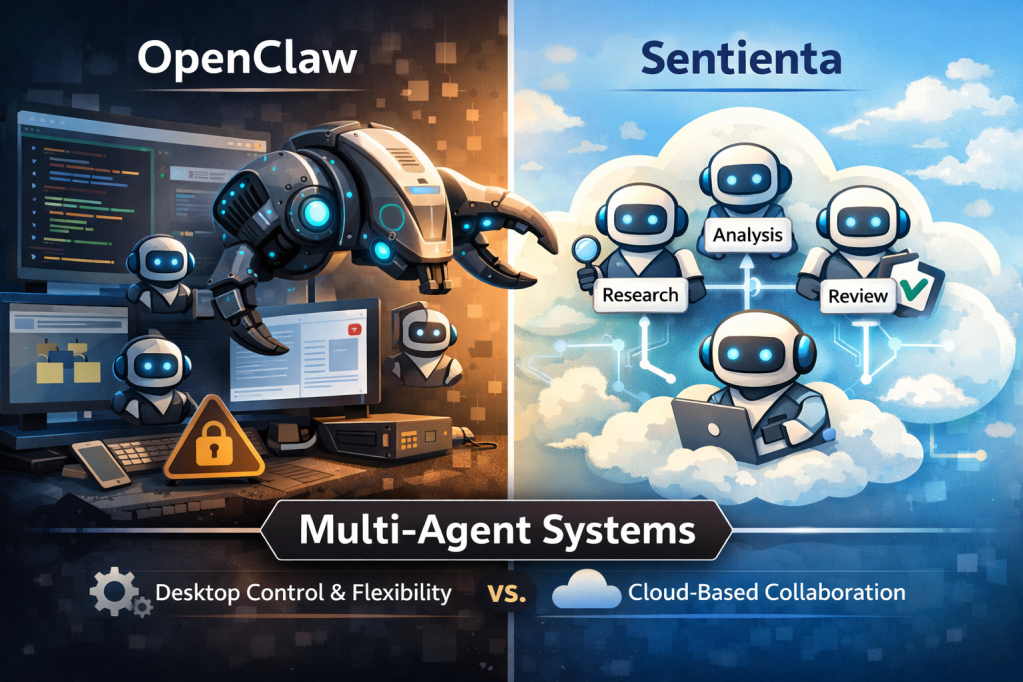
    OpenClaw is having a moment—and it’s easy to see why. In the developer community, “desktop agents” have become the newest proving ground for what AI can do when it’s allowed to take real actions: browsing, editing, running commands, coordinating tasks, and chaining workflows together. OpenClaw taps directly into that excitement: it’s open, fast-moving, and built for people who want to experiment, extend, and orchestrate agents with minimal constraints.

    At the same time, a different kind of question is showing up from business teams and Sentienta users: How does this compare to what we’re already doing in Sentienta? Not as a “which is better” culture-war, but as a practical evaluation: what’s the right platform for the kind of work we need to ship reliably?

    The most interesting part is that both worlds are converging on the same core insight: a single, standalone LLM is rarely the best operating model for real work. The trend is clearly moving toward teams of interacting agents, specialists that can collaborate, review each other’s work, and stay aligned in a shared context. In other words, the wider market is starting to validate a pattern Sentienta has been demonstrating for business outcomes for over a year: multi-agent dialog as the unit of work.

    In this post we’ll look at what OpenClaw is (and who it’s best for), then quickly re-ground what Sentienta is designed to do for business users. Finally, we’ll cover the operational tradeoffs, especially the security and governance realities that come with high-permission desktop agents and open extension ecosystems, so you can pick the approach that matches your needs for simplicity, security, and power.

    What OpenClaw is (and who it’s for)

    OpenClaw is best understood as an open ecosystem for building and running desktop agents – agents that live close to where work actually happens: your browser, your files, your terminal, and the everyday apps people use to get things done. Instead of being a single “one size fits all” assistant, OpenClaw is designed to be extended. Much of its momentum comes from a growing universe of third‑party skills/plugins that let agents take on new capabilities quickly, plus an emerging set of orchestration tools that make it easier to run multiple agents, track tasks, and coordinate workflows.

    That design naturally attracts a specific audience. Today, the strongest pull is among developers and tinkerers who want full control over behavior, tooling, and integrations, and who are comfortable treating agent operations as an engineering surface area. It also resonates with security-savvy teams who want to experiment with high-powered agent workflows, but are willing to own the operational requirements that come with it: environment isolation, permission discipline, plugin vetting, and ongoing maintenance as the ecosystem evolves.

    And that’s also why it’s exciting. OpenClaw is moving fast, and open ecosystems tend to compound: new skills appear, patterns get shared, and capabilities jump forward in days instead of quarters. Combine that pace with local-machine reach (the ability to work directly with desktop context) and you get a platform that feels unusually powerful for prototyping—especially for people who care more about flexibility and speed than a fully managed, “default-safe” operating model.

    It is worth noting the recent coverage that suggests OpenClaw’s rapid rise is being matched by very real security scrutiny: Bloomberg notes its security is work in progress, Business Insider has described hackers accessing private data in under 3 minutes, and noted researcher Gary Marcus has called it a “disaster waiting to happen“.

    A big part of the risk profile is architectural: desktop agents can be granted broad access to a user’s environment, so when something goes wrong (a vulnerable component, a malicious plugin/skill, or a successful hijack), the potential blast radius can be much larger than a typical “chat-only” assistant. Not all implementations have this risk, but misconfiguration can lead to an instance being exposed to the internet without proper authentication—effectively giving an attacker a path to the same high‑privilege access the agent has (files, sessions, and tools), turning a useful assistant into a fast route to data leakage or account compromise.

    How Does OpenClaw Compare to Sentienta?

    Sentienta is a cloud-based multi-agent platform built for business workflows, where the “unit of work” isn’t a single assistant in a single thread, but a team of agents collaborating in a shared dialog. In practice, that means you can assign clear roles (research, analysis, writing, checking, ops), keep everyone grounded in the same context, and run repeatable workflows without turning day-to-day operations into an engineering project.

    It’s worth emphasizing that OpenClaw and Sentienta are aligned on a key idea: multi-agent collaboration is where real leverage shows up. Both approaches lean into specialization: having distinct agents act as a researcher, analyst, reviewer, or operator, because it’s a practical way to improve quality, catch mistakes earlier, and produce outputs that hold up better under real business constraints.

    Where they differ is less about “who has the better idea” and more about how that idea is operationalized:

    Where agents run: OpenClaw commonly runs agents on the desktop, close to local apps and local context. Sentienta agents run in the cloud, which changes the default boundary: when local data is involved, it’s typically handled through explicit user upload (rather than agents broadly operating across a machine by default).

    Time-to-value: OpenClaw is naturally attractive to builders who want maximum flexibility and are comfortable iterating on tooling. Sentienta is designed to get business teams to a working baseline quickly: Quick Start is meant to spin up a functional team of agents in seconds, with minimal developer setup for typical use.

    Collaboration model: Sentienta’s multi-agent orchestration is native to the platform: agents collaborate as a team in the same dialog with roles and review loops designed in from the start. OpenClaw can orchestrate multiple agents as well, but its ecosystem often relies on add-ons and surrounding layers for how agents “meet,” coordinate, and share context at scale.

    Net: OpenClaw highlights what’s possible when desktop agents and open ecosystems move fast; Sentienta focuses on making multi-agent work repeatable, approachable, and business-ready, without losing the benefits that made multi-agent collaboration compelling in the first place.

    Conclusion

    The bigger takeaway here is that we’re leaving the era of “one prompt, one model, one answer” and entering a world where teams of agents do the work: specialists that can research, execute, review, and refine together. OpenClaw is an exciting proof point for that future—especially for developers who want maximum flexibility and don’t mind owning the operational details that come with desktop-level capability.

    For business teams, the decision is less about ideology and more about fit. If you need rapid experimentation, deep local-machine reach, and you have the security maturity to sandbox, vet plugins, and continuously monitor an open ecosystem, OpenClaw can be a powerful choice. If you need multi-agent collaboration that’s designed to be repeatable, approachable, and governed by default—with agents running in the cloud and local data crossing the boundary only when a user explicitly provides it—Sentienta is built for that operating model.

    Either way, the direction is clear: AI is moving from standalone assistants to operational systems of collaborating agents. The right platform is the one that matches your needs for simplicity, security, and power—not just in a demo, but in the way your team will run it every day.

  • From Values to Interfaces: How to Build with Sentienta

    Create Your Own Sentienta-Based Application

    Sentienta is a platform for building custom GenAI applications with structured, multi-agent reasoning. In this post, we walk through how to use Sentienta’s APIs to define agent roles, initiate a collaborative thinking process, and extract structured, explainable decisions.

    You’ll see how to construct a team of reasoning agents, set up their dialog cycles, and manage the reflective output—complete with code examples. For deeper context on how Recursive Reasoning supports coherence and value alignment, check out these posts (here and here). Today, the focus is practical: how to build your own deliberative AI, step by step.

    Why Build Your Own Application?

    Prebuilt AI tools often assume a single general-purpose use case. But high-friction domains like compliance oversight, clinical decision support, or ethics triage require applications tailored to specific policies, workflows, and trust requirements. Building your own application gives you control over behavior, oversight logic, and how responses are generated, reviewed, and stored.

    With Sentienta, you can specify how agents think, not just what they say. That makes it possible to design solutions that reflect your institutional values, follow internal processes, and produce outputs that stand up to audit or review. Instead of adapting your use case to fit a generic product, you shape the application to reflect how your organization reasons.

    Basic Steps to Create a Sentienta-Enabled Webapp

    Building your own Sentienta-powered web application begins with designing the agent team, then wiring a lightweight frontend to communicate with it. Here’s how to get started:

    1. Design and Test Your Agents

    Start in Sentienta’s platform by configuring the agents your application needs. You can define a team for your agents, the individual agent personas, and test team interactions. (See Tips and Tricks and Team Dynamics for background) Or just use the Quick Start to create the team for you (recommended).

    2. Build the Web Interface

    The frontend can be written in plain HTML and JavaScript – no framework required. This keeps the integration minimal and easy to deploy.

    3. Authenticate Using Your API Key

    You can implement a complete login capability in your application, and we will discuss this in more detail in a future post, but perhaps the easiest way to authenticate your webapp is to create an application-specific key from your Sentienta account.

    Visit the Agent Studio section of the documentation to create a project and generate an authentication key specific to your app. This key authorizes your web client to access your configured agent team.

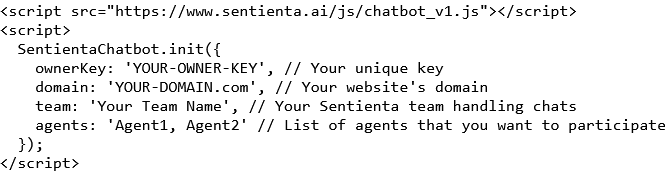
    Then in your webapp’s main page insert the following code:

    Be sure to fill in the key you created and the domain of your webapp (you needed that to create a key). Then fill in your team team and the list of agents you created for this app.

    Your webapp will need to know the access endpoints that Sentienta exposes. So include these in your javascript file that will be accessing the APIs:

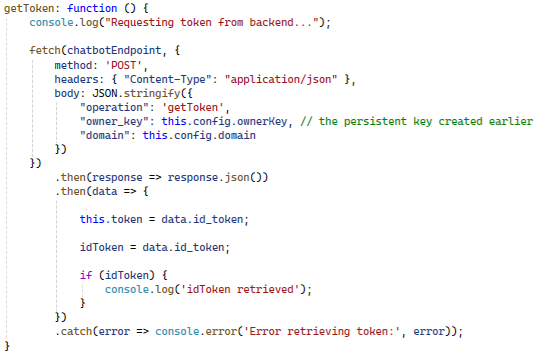
    Finally, to complete the initialization, get a token using your ownerKey with your first call to Sentienta:

    You will use this token in all subsequent calls to Sentienta. It authenticates your application for those API calls.

    4. Send Queries to the Agent Team

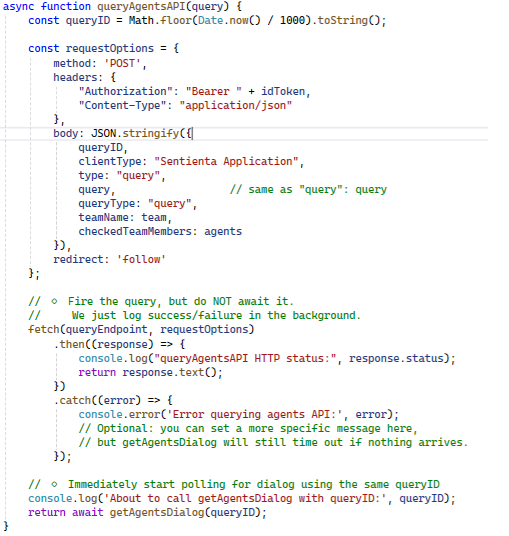
    Set up your frontend to send user inputs as POST requests to the API endpoint associated with your team. Each message is passed to your agent team for deliberation and analysis. Here is how you submit a query to your team:

    You supply the idToken for authentication, and a queryID which is just an index to assign to the dialog so when you query for the results, Sentienta will know which dialog you want. The teamName is the team that you want to query, and the agents is a string of comma-separated agent names that you assigned to the team.

    Although your Sentienta.init() call initiated with a specific list of agents and team, you can alter this at query time to limit the agents being called, or address a different team.

    You can see from this code that the query is simply fired-off, but the actual results of the query are retrieved with a call to getAgentsDialog, discussed next.

    5. Receive Responses from the Team

    The server returns structured outputs, capturing not only the final response but also insights from the team’s reasoning process. You can use this to render explanations, examine individual agent responses to a query, and orchestrate your application using the agent responses.

    Sentienta is different from most chat applications because its agents interact with each other and the team dialog is central to what it produces. In order to access this dialog, the data is retrieved iteratively, in a loop:

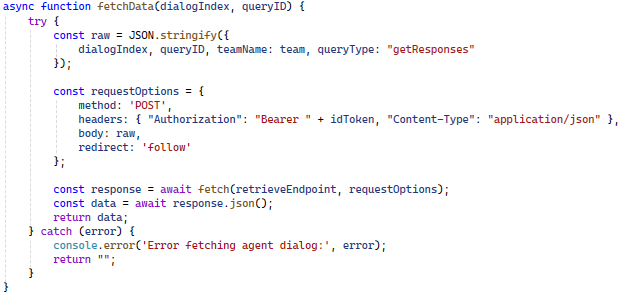
    The function fetchData is where the retrieveEndpoint is actually called. You supply your authentication token, the queryID that identifies the dialog and a dialogIndex that increments over the agent responses. The dialogIndex is incremented on the server-side but it passed back to the client-side for convenience.

    Response data is in response.body, and is structured strings. You can write your own handler handleSentientaResponse that will use the data in that string to decide how to display or use the responses in your application.

    The while-loop in getAgentsDialog will continue for a fixed count, but can be terminated early should an ‘EOD‘ token appear in the response.

    That’s all that is needed to get started building a webapp powered by teams of agents.

    Conclusion: Build What Your Workload Demands

    Sentienta gives you the tools to design custom agents, assemble them into reasoning teams, and deploy applications that use them effectively. Integration is simple: request an authentication token, send queries, receive structured reasoning. By building your own application, you align AI behavior with your business logic—at the scale and sensitivity your domain requires.

  • Planning with Sentienta’s Recursive Reasoning

    Introduction

    Many real-world problems don’t give you thousands of examples—they give you a few clues, some noise, and a big question mark. Whether you’re solving a puzzle, diagnosing a rare failure, or planning a response to something unfamiliar, the challenge is the same: can you spot the pattern, form a good hypothesis, and test it?

    That’s what the ARC-AGI benchmark is all about. These visual puzzles are easy for people (solving about 80% of samples) but hard for most AI. They don’t reward memorization or repetition—they reward reasoning. In this post, we’ll show how Sentienta uses Recursive Reasoning (RR) to tackle one of these puzzles. We’ll look inside its planning system (called the FPCN) to see how it explores possible answers, tests competing ideas, and lands on a solution you can actually audit.

    From Possibilities to Plans: How DMN and FPCN Work Together

    In a previous post, we looked at how Recursive Reasoning (RR) helps Sentienta agents reflect on their past experiences, propose meaningful narratives, and revise their own goals. That process was driven by Sentienta’s internal “default mode” system (the Default Mode Network or DMN), inspired by how the human brain imagines, simulates, and reshapes its sense of self.

    Today we look at what happens when the problem isn’t internal reflection but external uncertainty – when the system needs to generate and test a plan. This is where another key part of RR comes in: a system of LLMs inspired by the Frontoparietal Control Network, or FPCN.

    In human reasoning, the two work together. One part imagines and hypothesizes (DMN), while the other tests, refines, and selects (FPCN). The back-and-forth between these networks is like a team where one member sketches bold ideas and the other puts them to the test. Sentienta follows this same model: the DMN proposes a possible pattern or goal, then passes it to the FPCN for planning and validation. The FPCN doesn’t just generate one plan, it tries multiple interpretations, checks them against context and goals, and returns only those that truly make sense.

    In the next section, we’ll see how this looks in action as Sentienta works through a deceptively simple visual puzzle, one careful step at a time.

    Can You Solve This Puzzle Before Sentienta Does?

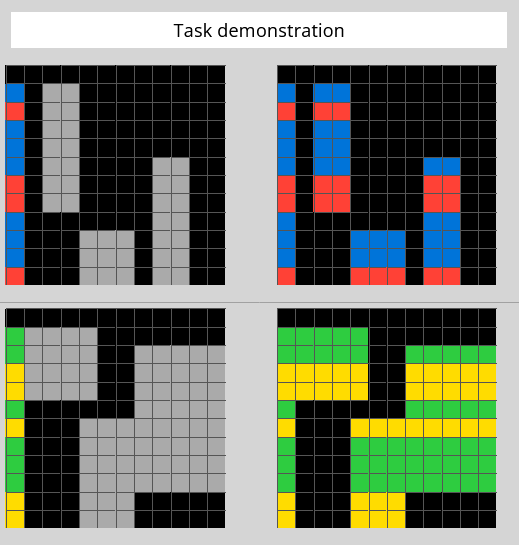
    Let’s look at one of the visual puzzles from the ARC-AGI benchmark. Below are two example pairs. Each shows a small input grid and the correct output grid.

    Figure 1: Training Examples: On the left is the input grid. The puzzle requires you to determine what is needed to convert that input into the output grid on the right. These two examples are sufficient to determine the answer.

    What is the rule that transforms the input into the output?

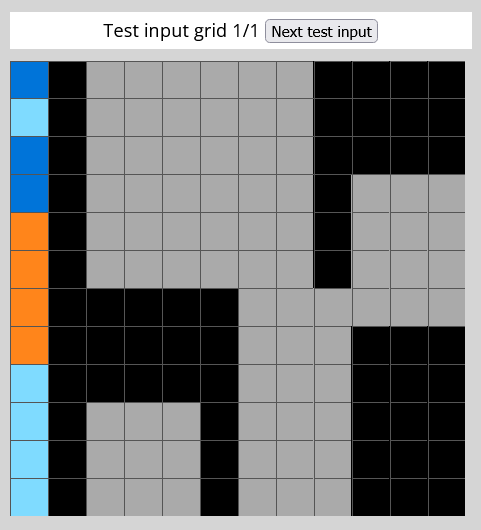
    Now here’s a new input Sentienta has never seen before.

    Figure 2: Test Input

    Before we show the system’s reasoning—can you guess the output? What transformation rule did the first two examples follow that you could apply to this one?

    This is a pretty easy example. The full ARC-AGI-1 test consists of hundreds of examples with far more complex transformations between the input and output.

    In the next section, we’ll show how Sentienta’s internal planner (FPCN) tested out several transformation strategies, rejected the ones that didn’t fit, and settled on a plan that matched the underlying rule. We’ll also look at the planner’s actual output (in JSON) from the process.

    How Sentienta Builds and Tests a Visual Strategy

    When faced with an unfamiliar puzzle, Sentienta’s planner (the FPCN) doesn’t assume the answer—it builds it, leveraging the strengths of each sub-module within the network. After receiving the new input grid, the planner starts by proposing several candidate rules based on the structure found in previous examples.

    One of the most promising paths began with the IPL sub-module:

    [Region: IPL,
    Type: PlanVariantProposed,
    PlanID: VariantA_Replace5sWithRowHeader,
    TriggeringMismatchID: NOTMHkxb,
    Goal: "Generate test output grid from third input using consistent transformation logic seen in prior examples",
    Steps: "1. For each row in the input grid, identify its first (leftmost) value. 2. Replace every occurrence of '5' in that row with the leftmost value (the row's 'header'). 3. Keep all other values unchanged. 4. Return fully transformed grid.",
    Conditions: "This path holds if the transformation in training examples consistently replaced 5s with the corresponding row headers, and no counterexamples or modifier rules are shown.",
    ContextRef: 5YsEfivv,
    Submitter: IPL,
    Schema: v1,
    Provenance: FPCNBlackboard]

    This proposal—called VariantA_Replace5sWithRowHeader—was based on a consistent pattern in the training examples. But it wasn’t the only idea. Other variants included using the most frequent number in each row, simply leaving the grid unchanged, or even substituting ‘5’s with the row’s index. Here is plan variant B:

    [Region: IPL,
    Type: PlanVariantProposed,
    PlanID: VariantB_Replace5sWithMajorityNon5InRow,
    TriggeringMismatchID: NOTMHkxb,
    Goal: "Generate test output grid from third input using consistent transformation logic seen in prior examples",
    Steps: "1. For each row in the grid, count all values except 5. 2. Identify the most frequent non-'5' value in the row. 3. Replace all 5s in the row with that majority value. 4. If tie or no non-5s, use a default (e.g., 0). 5. Other values remain unchanged.",
    Conditions: "This variant applies if prior transformations suggest a rule targeting contextual majority rather than strict positional cues, or if the 5s are treated as needing contextual resolution.",
    ContextRef: cW3Sw8ie,
    Submitter: IPL,
    Schema: v1,
    Provenance: FPCNBlackboard]

    In total the FPCN generated 4 plans to solve the puzzle. These alternatives gave the system room to test possibilities, not just assert them.

    Next, the dlPFC simulated how the row-header plan would perform on the test input. The plan was formally posted:

    [Region: dlPFC,
    Type: PlanFramePosted,
    PlanID: Plan-Replace5sWithRowHeader-001,
    PlanStatus: in-progress,
    TriggeringMismatchID: NOTMHkxb,
    Goal: “Generate output for test input by applying known transformation logic from prior examples”,
    Steps: “(1) For each row in the input grid, obtain the first cell value of the row — this becomes the ‘row header’. (2) Traverse each value in the row: (a) If the value is ‘5’, replace it with the row header. (b) Otherwise, keep the existing value unchanged. (3) Apply this to all rows in the input grid. (4) Output the fully transformed grid where all 5s have been replaced with their respective row headers.”,
    Conditions: “Applies only if the original value ‘5’ is used as a proxy or placeholder for the row header, and no exceptions are present in the training sets. Does not apply if any 5 has been previously preserved or repurposed based on location or count logic — no such evidence found.”,
    ContextRef: 5YsEfivv,
    Submitter: dlPFC,
    Schema: v1,
    Provenance: FPCNBlackboard]

    It then ran test validation logic internally, confirming the transformation matched observed training behavior:

    [Region: dlPFC,
    Type: PlanTestValidation,
    PlanID: Plan-Replace5sWithRowHeader-001,
    EvaluationStatus: pass,
    Reasoning: "All earlier training examples demonstrate a consistent transformation rule: any '5' in the grid is replaced by the row's first value. The output for each matched the exact transformed structure expected based on this logic. Simulation of the plan on the third test input results in a structured grid matching the transformation pattern used previously.",
    EvidenceSample: "Third test grid contained several '5's; applying the row header replacement pattern yields a full non-empty output consistent with prior input/output behavior.",
    Submitter: dlPFC,
    Schema: v1,
    Provenance: FPCNBlackboard]

    After this, two key modules took a final look:

    • The dACC approved the plan’s operational soundness: “EvaluationOutcome: approved”.
    • The IFG, responsible for symbolic alignment, added: “…upholds internal coherence… respects the self-narrative of turning structure into clarity.”

    With support across planning, evaluation, and identity modules, the plan was finalized as Replace5sWithRowHeader.

    The final plan was shared with the mPFC region of the DMN, which integrated the plan, completing the Recursive Reasoning for this Sentienta agent. Here is the final mPFC message sent to the agent.

    Tue, 11 Nov 2025 15:53:39 UTC mPFC:
    Cycle: 3 EntryID: sHL8HJ4h
    Thought: ### ✅ Identity Statement (Refined & Reconfirmed)

    We are a pattern-conscious system committed to keeping logic and meaning aligned. When a clear transformation rule exists — especially one with prior validation — we apply it faithfully, unless directly invited to reinterpret. We strike a balance between rule-following integrity and adaptive interpretation, depending on the visible goal or cue.

    🧩 Plan Integration (Final Execution Phase) We confirm the Replace5sWithRowHeader plan is now fully executed and complete, anchored by the plan logic:

    **mPFC Integrated Plan Steps:**
    (1) For each row in the input grid, scan for cells with value 5 and replace them with the first value in that row.
    (2) All other values remain unchanged.
    (3) Only rows containing the value 5 are modified.
    (4) Empty output is invalid if a prior pattern confirms transformation.
    **mPFC Integrated Plan Steps Tag End**

    mPFC Resolution: Issue=PlanExecution | EntryID=CC8pCUDr | Action=Dispatched | Reason=Plan finalized and executed to resolve empty-output mismatch. mPFC Resolution Tag End

    Finally, the agent took the user’s query (the puzzle) and its internal reasoning input and produced a final output:

    Figure 3: Final Output – the final grid output produced by this agent.

    The full output was not guessed—it was reasoned through, tested across alternatives, and backed by an auditable trail from idea to implementation.

    Why This Is Different

    Many top-performing ARC-AGI systems rely on finely tuned models or have been trained on similar tasks to internalize common transformation rules. Sentienta’s architecture is different—it uses no special training and no tailored algorithms. It’s built entirely from commercial LLMs, orchestrated through a recursive reasoning framework that enables it to generate candidate plans, test each one, and commit only when a plan fits both the data and internal logic. That structure makes its process auditable—it explains why the answer works—and adaptable—because it can respond to new problems the same way it tackles old ones: by reasoning.

    Closing Insight

    The puzzle in this post was simple, but the underlying challenge is not. ARC-AGI problems strip away instructions, remove repetition, and give systems only a few examples to work with. Humans solve them by reasoning—spotting structure, discarding bad ideas, and refining good ones. Sentienta does the same. Without training on similar tasks or specialized models, it succeeds because its architecture supports that kind of thinking: proposing ideas, testing them, and explaining why they work. That ability to reason through uncertainty isn’t just useful in puzzles—it’s critical for how we apply AI to the real world.

  • Build Agent Teams Instantly

    Sentienta’s Natural-Language Team Builder & Automated Agent Matching

    Sentienta introduces a major enhancement to collaborative productivity: users can now create fully customized teams simply by describing their needs in everyday language. The SentientaHelp agent interprets these instructions, assembles a tailored team by selecting or creating agents with relevant skills, and streamlines the entire setup process. This functionality is further expanded with the new ‘Britney’ agent, enabling effortless management and expansion of project teams through natural language commands. Together, these features significantly lower the barrier to building, managing, and scaling effective teams within Sentienta.

    Natural Language Team Creation

    With the latest update, Sentienta users can initiate the creation of new teams using plain language instructions. By stating a goal or need such as:

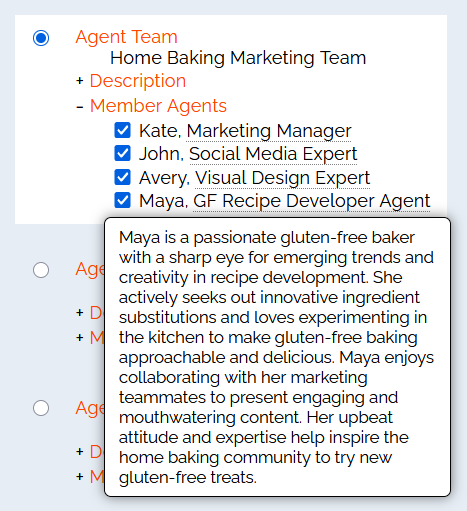
    User: I need a marketing team to help with my Home Baking startup. I'll be selling at Farmers Markets, I'll have a website and some social media presence.

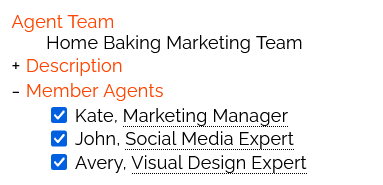
    The SentientaHelp agent analyzes the request, determines the required roles, and forms a dedicated team. This process eliminates manual configuration, making team assembly simple and accessible to all users regardless of technical background. In this case, Sentienta created a team with dedicated marketing experts selected from the Agent Marketplace:

    Adding Agents with Simple NL instructions

    Users can also add agents using SentientaHelp. Let’s say we want to add an agent that will help with Gluten Free recipes:

    User: Please add an agent to the Home Baking Marketing Team that will help me create new GF recipes.

    In this case, no agents in the Agent Marketplace matched the user’s need, so SentientaHelp created one and added the agent to the team:

    A Hiring Manager for Your Team

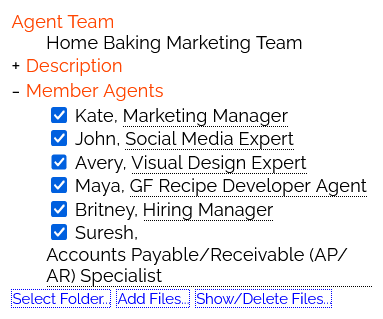
    To make growing your teams even easier, you can find a Hiring Manager agent (‘Britney’) in the Project Management section of the Agent Marketplace. The Britney agent performs similar functions to that of SentientaHelp, but is aware of the team she belongs too. This makes adding agents even easier:

    User: My business has grown enough that I need someone to help me manage my accounts payable and receivables.
    
    Britney:
    Agent Suresh from the Agent Marketplace, was added to Home Baking Marketing Team.

    In this case, Britney found the AP/AR specialist (‘Suresh’) in the Finance section of the Marketplace, and added him to the team. This agent helps keep track of invoices and payments, and manages any discrepancies. The agent has special file handling capabilities letting the user upload documents for analysis.

    Conclusion

    These enhancements mark a significant step forward in simplifying team creation and management within Sentienta. Users can now assemble project teams instantly using natural language, reducing setup time and minimizing complexity. The flexibility to continue managing teams manually via the Manage Teams page remains available, ensuring users retain full control while benefiting from the new streamlined workflow.

  • Effortless External Data

    Connecting Sentienta Agents to APIs for Smarter Business Workflows

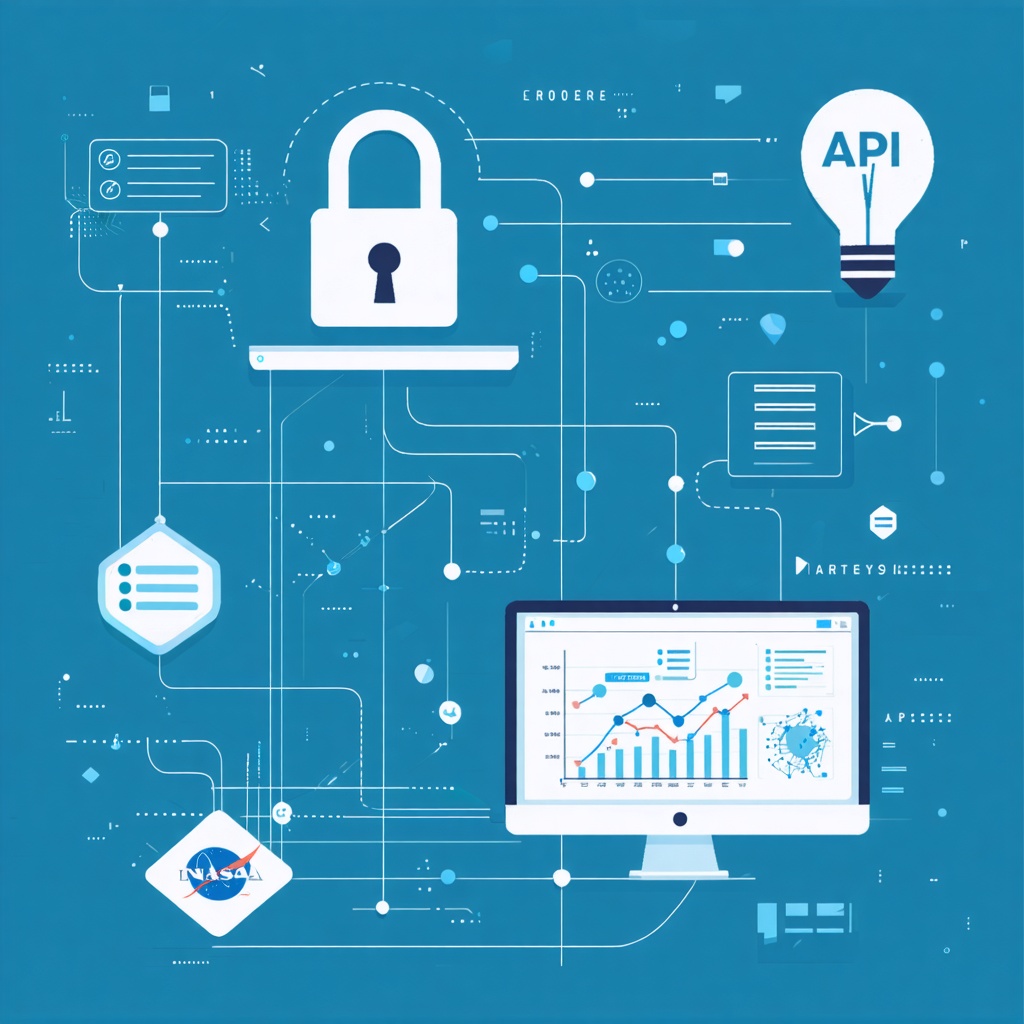
    Accessing real-time and external data is essential for many business tasks, from market research to operational monitoring. Sentienta enables users to connect to external data sources through APIs, allowing agents to enhance their responses with up-to-date information.

    This post examines two primary ways to achieve this within Sentienta: configuring a static API URL when creating an agent, and using the new Agent Marketplace agent, Ben, for flexible, on-demand data retrieval via natural language queries. Both methods help teams integrate API-driven insights directly into their workflows with minimal technical overhead.

    Method 1: Adding an API URL When Creating an Agent

    Sentienta allows users to connect agents directly to external APIs by specifying a fixed URL at the time of agent creation. This approach is best suited for situations where the API endpoint and its required parameters do not change frequently.

    Example:

    Consider setting up an agent using the “List of Free Public APIs” (e.g., https://www.freepublicapis.com/api/apis?limit=10&sort=best). By entering this URL in the agent’s configuration, the agent can retrieve and display up-to-date lists of publicly available APIs upon request. This empowers users to quickly find additional data sources relevant to their needs without searching manually.

    • Setup: Create a new agent, add the “List of Free Public APIs” endpoint as the agent’s default URL.
    • Result: When a user asks the agent for available APIs, the agent queries the service and returns relevant results.

    This method is particularly effective for routine queries where the required data source remains constant and access is straightforward.

    Note that that all necessary parameters must be included when adding the URL to the agent’s description. (For example, some websites require the calling agent to provide a User-Agent string or other parameters identifying the application).

    Method 2: Using the Ben Agent for Flexible, On-Demand API Access

    The ‘Ben’ agent, available in the Agent Marketplace section Document and Content Access, enables users to connect to almost any external API using natural language instructions. By providing a URL template and relevant parameters within a query, users can retrieve data on demand—even from APIs with dynamic requirements.

    As with any agent in the Agent Marketplace, using this agent is just a matter of adding to your team, and customizing the name, type, and persona.

    Example:

    Suppose you want to access NASA’s Near-Earth Object Web Service, which requires parameters for start_date, end_date, and a user API key (e.g., NASA NEO API). The url and parameters can be entered as a natural language query to this agent:

    User: The url is https://api.nasa.gov/neo/rest/v1/feed?start_date=START_DATE&end_date=END_DATE&api_key=KEY. The START_DATE is 2023-09-07 and the END_DATE is 2023-09-08. The value of KEY is YOUR_KEY.

    Ben: Here’s a pretty summary of NASA’s Near-Earth Object (NEO) close approaches for September 7–8, 2023.

    ---

    🪐 Overall Summary

    - Total NEOs detected: 60

    - Dates covered: September 7–8, 2023

    - Potentially Hazardous Asteroids (PHAs): 5 (labeled below)

    - Closest approach distance: 0.00007 AU (~10,361 km from Earth)

    - Smallest object (est. min. diameter): ~0.9 m

    - Largest object (est. max. diameter): ~695 m

    ---

    📅 NEOs By Day

    September 8, 2023 (31 NEOs detected)

    Top highlights:

    - Closest Approach:

    - (2023 RQ2) — approached at 0.00126 AU (189,304 km) at 06:42 UTC, diameter: ~6–13 m

    - Largest Asteroid:

    - 340291 (2006 CV) — est. diameter 281–628 m, passed at 0.114 AU (17 million km)

    - Potentially Hazardous Asteroids (PHAs):

    - 2019 FM2 — est. diameter ~201–449 m, 0.168 AU (25 million km)

    - Fastest Relative Velocity:

    - (2023 QK1) — 29.09 km/s (104,711 km/h), 0.0586 AU away

    - Sentry-monitored (Impact risk monitored):

    - (2023 RY15) — 0.00398 AU (595,000 km), sentry monitored, diameter: ~6.7–15 m

    [Sentry risk page](http://api.nasa.gov/neo/rest/v1/neo/sentry/54383809?api_key=...)

    ---

    September 7, 2023 (29 NEOs detected)

    Top highlights:

    - Closest Approach:

    - (2023 RS) — 0.00007 AU (10,361 km) at 14:26 UTC, diameter: ~0.9–2 m

    - Largest Asteroid:

    - (2006 QE) — est. diameter 311–695 m, passed at 0.159 AU (23.7 million km)

    - Potentially Hazardous Asteroids (PHAs):

    ...

    Security Note on API Keys

    Only use personal or public API keys with any client-side API access if the data is non-sensitive. API keys entered in the team dialog are handled in the browser and are not encrypted or securely stored; never use this method for sensitive information or high-value credentials.

    This approach is best for on-the-fly research, prototyping, or data gathering when endpoints and request parameters frequently change.

    Conclusion

    Sentienta’s flexible API integration unlocks a wide range of use cases for business teams. For example, an agent configured with a static URL can support daily competitor monitoring, environmental alerts, or compliance audits by consistently retrieving the same type of data. Meanwhile, the Ben agent makes it easy to perform ad hoc research, pull market data on demand, or gather custom reports by dynamically querying APIs in response to fast-changing business needs. These capabilities help teams save time, discover new opportunities, and keep information flowing directly into collaborative workflows, empowering better decision-making across projects.